Top Wearables for Tracking Strength, Mobility, and Fall Risk in Seniors

Top Wearables for Tracking Strength, Mobility, and Fall Risk in Seniors

Last updated: August 20, 2026

Quick Answer

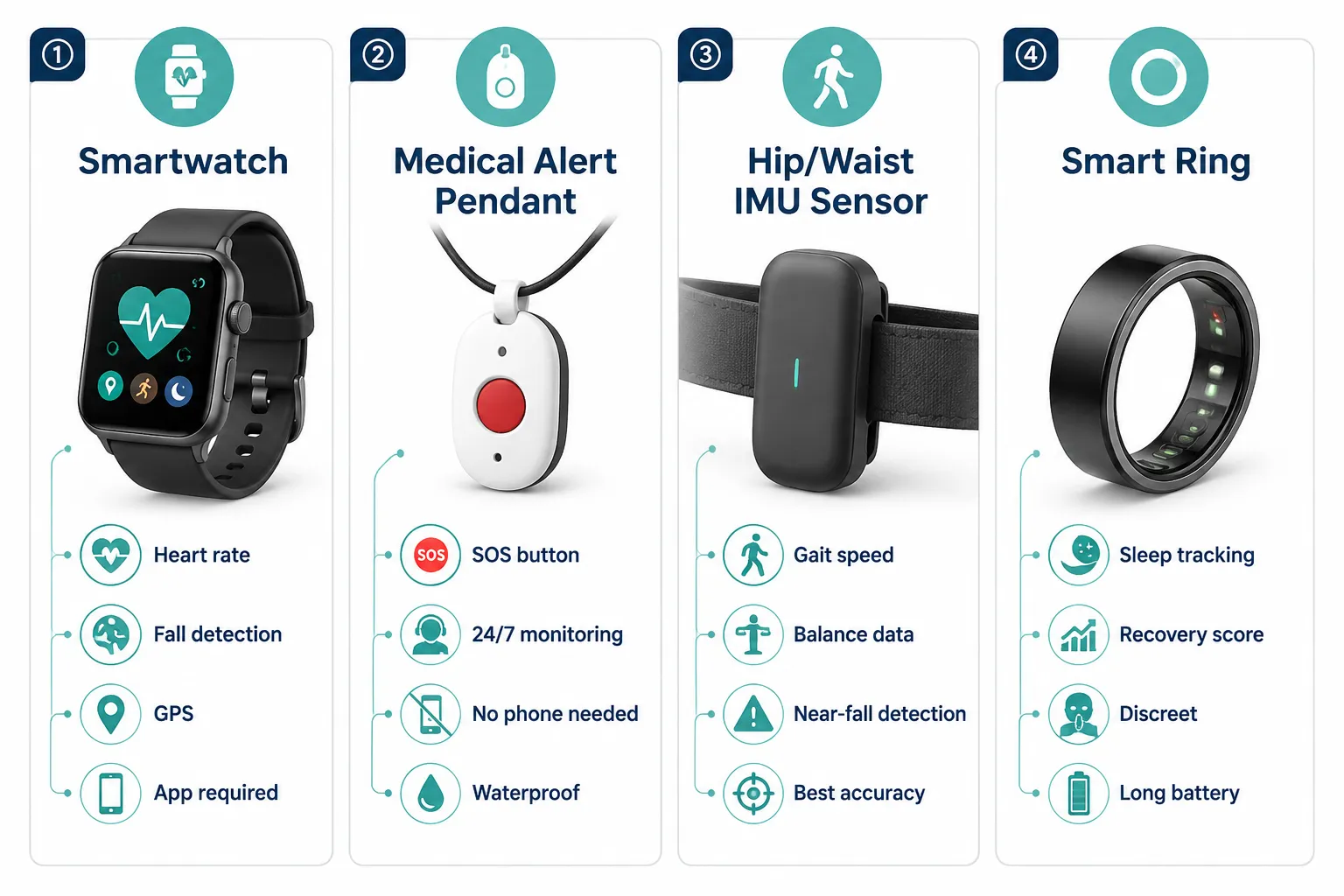
The top wearables for tracking strength, mobility, and fall risk in seniors in 2026 fall into three buckets: smartwatches (Apple Watch Series 9/SE, Google Pixel Watch 2, Samsung Galaxy Watch 6) for active seniors, dedicated medical alert wearables (Lively Mobile Plus, Bay Alarm SOS Smartwatch, Medical Guardian MGMove) for hands-off safety, and research-grade IMU sensors (hip- or ankle-worn devices) for the most accurate gait and near-fall detection. Choose based on tech comfort, cellular needs, and whether the priority is fitness coaching or emergency response.

Key Takeaways

  • Gait speed, double-support time, and vertical oscillation captured by a single wearable are validated proxies for muscle strength and sarcopenia risk in older adults.[1]
  • Hip, ankle, and lower-back sensors outperform wrist-worn devices for detecting near-falls, with multi-sensor systems reaching up to 100% sensitivity in controlled tests.[5]
  • Fall detection automatically calls for help after an impact; fall alert requires the user to press a button. Both matter, and the best devices offer both.
  • Apple Watch fall detection works for seniors but is calibrated for users over 55 and can miss slow, sliding falls or generate false alarms during vigorous activity.
  • Wearable-supported exercise programs produce meaningful gains in lower-limb strength and balance compared with unstructured activity.[2]
  • Under $200 options exist and work well: Fitbit Inspire 3, Amazon Halo View, and Bay Alarm's basic pendant all deliver core tracking without a monthly fee (in some cases).
  • The best senior wearables combine sensor data with self-reported and clinical inputs, pure sensor models miss psychological and social frailty factors.[3]

What wearables can track fall risk in elderly people?

Fall-risk wearables use inertial measurement units (IMUs), a mix of accelerometers, gyroscopes, and sometimes magnetometers, to record how a person walks, turns, and shifts weight. From that data, they extract gait speed, stride length, step symmetry, and postural sway, all of which predict future fall risk.

The strongest 2026 options for fall-risk tracking specifically:

  • Apple Watch Series 9 / Ultra 2, hard-fall detection, irregular gait notifications via third-party apps, and walking steadiness metric in the Health app.
  • Google Pixel Watch 2, fall detection with automatic emergency SOS, Fitbit gait and cardio load metrics.
  • Bay Alarm Medical SOS Smartwatch, cellular, fall detection, no smartphone required.
  • Kanega Watch (UnaliWear), designed specifically for seniors, always-on cellular, fall detection, medication reminders.
  • Research-grade lumbar IMUs (used by clinics), most accurate for near-fall detection.[5]
What wearables can track fall risk in elderly people?

Choose a fall-risk wearable if: the user has fallen in the past year, uses a cane or walker, takes four or more medications, or lives alone.

Best fitness trackers for seniors with mobility issues

For seniors with mobility limitations, the best fitness trackers prioritize simple displays, gentle activity goals, and metrics that matter more than step counts, like walking steadiness, active minutes, and heart-rate recovery.

Top picks in 2026:

Device Best for Fall detection Standalone cellular
Apple Watch SE (2nd gen) Balanced value + safety Yes (age 55+) Optional
Fitbit Charge 6 Simple daily tracking No No
Google Pixel Watch 2 Android users Yes Optional
Bay Alarm SOS Smartwatch Non-tech seniors Yes Yes
Kanega Watch Seniors without smartphones Yes Yes
Garmin Vivosmart 5 Long battery life No No

For users with arthritis or dexterity issues, prioritize devices with larger touch targets, physical buttons, and voice control. The Kanega Watch and Bay Alarm SOS both use speak-to-activate SOS, which matters when small screens become hard to tap.

How do strength tracking wearables work for older adults?

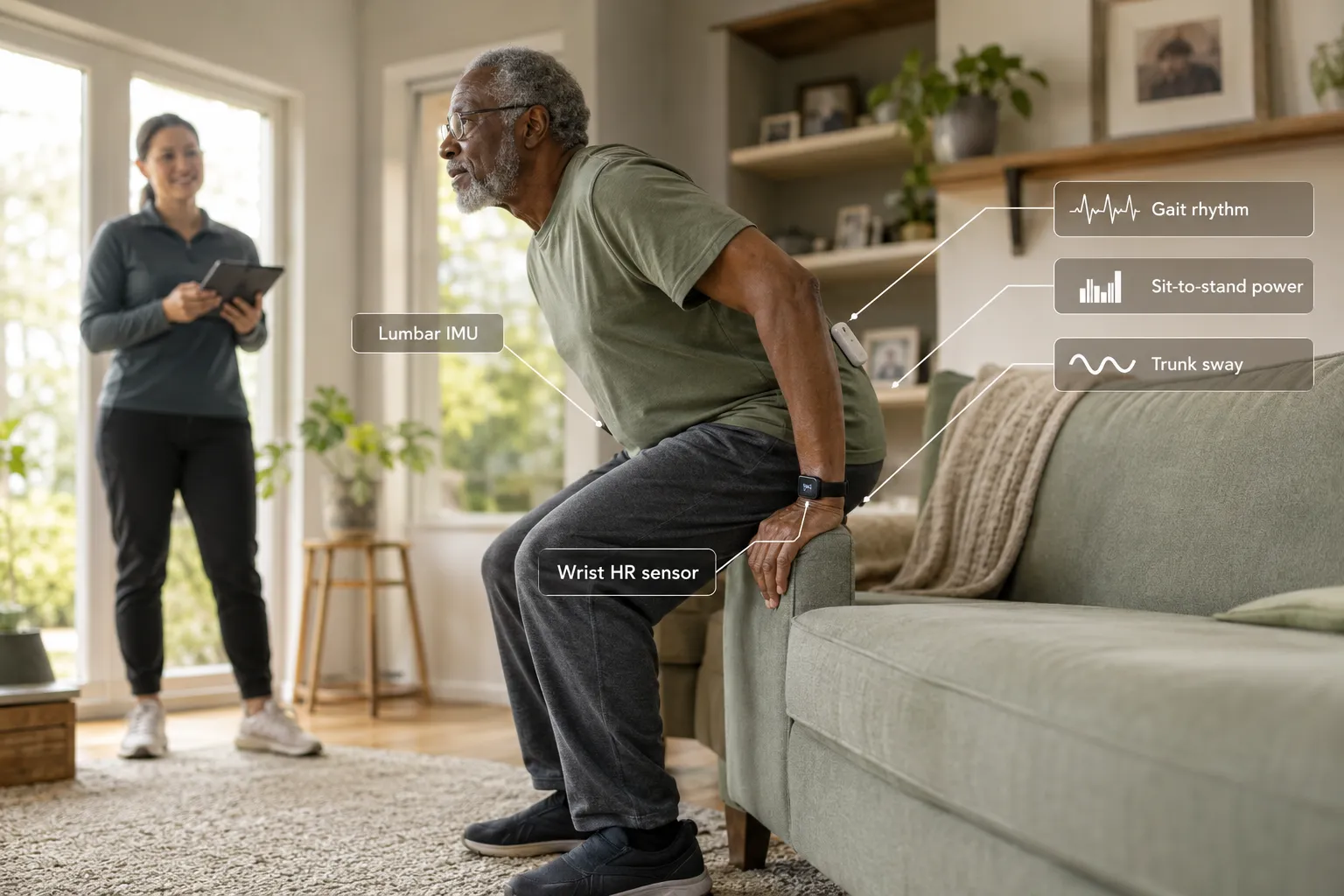
Strength tracking wearables estimate muscle function indirectly by measuring how the body moves, not by measuring force output directly. Sensors detect sit-to-stand power, gait speed, and vertical oscillation, all validated proxies for lower-body strength and sarcopenia risk.[1]

A 2025 study of community-dwelling older adults found that gait metrics from a single wearable correlated strongly with handgrip strength, muscle mass, and standard physical performance tests, meaning one sensor can flag likely sarcopenia without a clinic visit.[1]
How do strength tracking wearables work for older adults?

How the estimation works in practice:

  1. The sensor captures raw acceleration and rotation data during daily movement.
  2. Algorithms extract gait speed, cadence, stride variability, and turn duration.
  3. Machine-learning models compare those values to age- and sex-matched norms.
  4. The app or clinician dashboard flags decline over weeks and months.

A 2026 systematic review found that wearable-supported exercise programs produced small-to-moderate but significant gains in lower-limb strength and balance compared with control groups, confirming these devices can drive behavior change, not just measure it.[2]

Smartwatch vs dedicated fall detection device for seniors

A smartwatch is better for active, tech-comfortable seniors who want fitness plus safety. A dedicated fall detection device is better for frail, cognitively impaired, or non-tech-savvy seniors who need one-button emergency response.

Choose a smartwatch (Apple Watch, Pixel Watch, Galaxy Watch) if:

  • The user already owns and uses a smartphone
  • Fitness tracking, notifications, and coaching matter
  • They can charge a device daily
  • Falls are a possible but not imminent risk

Choose a dedicated device (Medical Guardian, Bay Alarm, Lively) if:

  • The user is 80+ or has cognitive decline
  • Battery life must last days or weeks, not hours
  • 24/7 professional monitoring is desired
  • The user doesn't want or can't manage a smartphone

The dedicated devices route to a live monitoring center, while smartwatches typically call emergency contacts or 911 directly. For someone who might not remember to charge a watch or who lives alone with no nearby contacts, the monitoring center model is safer.

Affordable wearables for senior health monitoring under $200

Under $200 in 2026, seniors can get solid tracking without sacrificing safety features. The tradeoff is usually no cellular, no monitoring service, or a smaller display.

Best value picks under $200:

  • Fitbit Inspire 3 (~$100), step, sleep, heart rate; needs phone for alerts.
  • Apple Watch SE 2nd gen (~$189 refurbished), fall detection, HR, ECG on some models; needs iPhone.
  • Bay Alarm Medical In-Home Pendant (~$30/mo, no upfront), one-button SOS, fall detection add-on.
  • Amazfit Bip 5 (~$90), long battery, basic activity, no fall detection.
  • Kanega Watch (subscription-based, hardware often included in plan under $200 first-month equivalent), cellular, fall detection.

Common mistake: buying a cheap tracker with no fall detection and no cellular for a high-risk senior. If the user has fallen before, spend the money on a device that can call for help without a phone nearby.

Can Apple Watch detect falls in seniors?

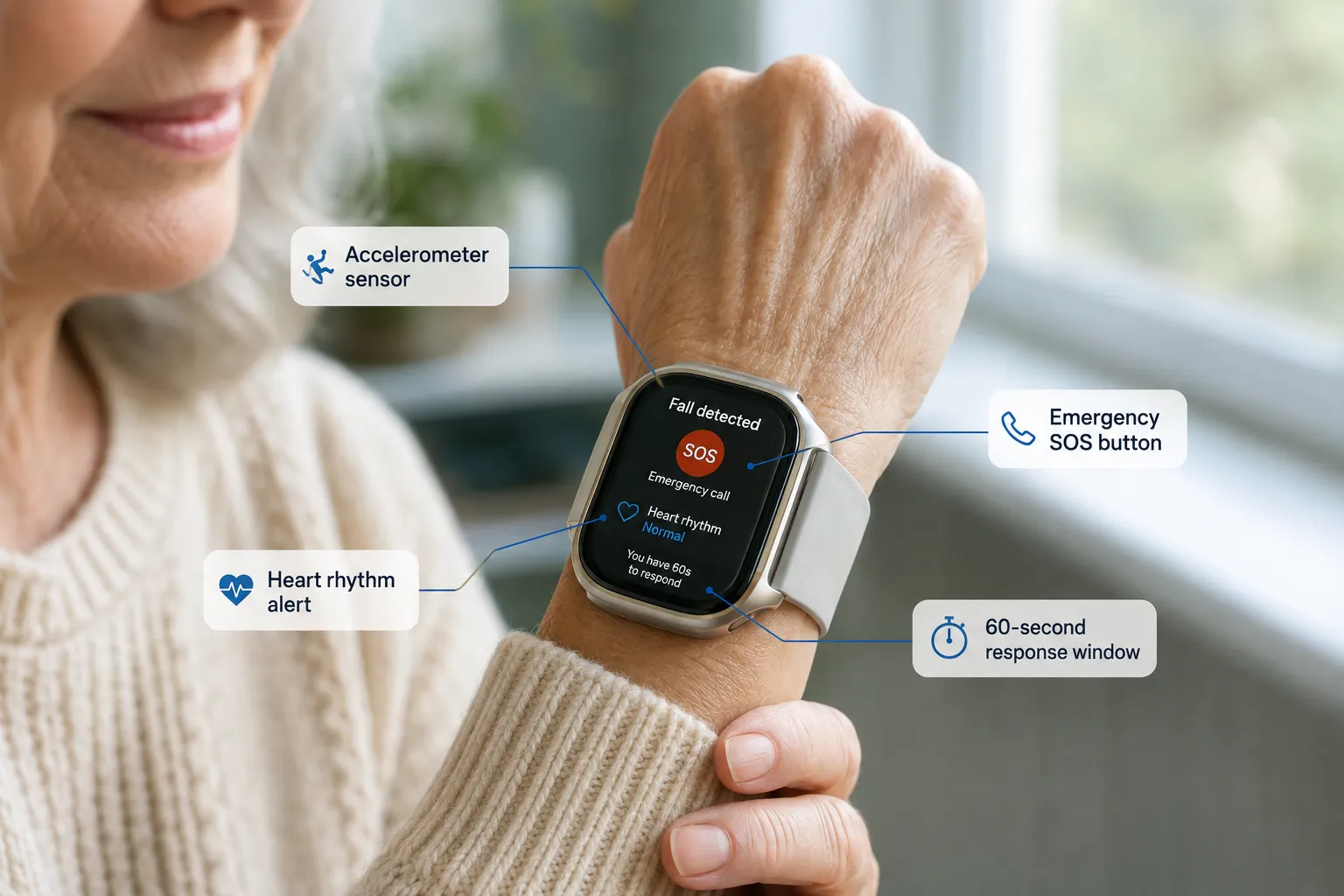
Yes, Apple Watch Series 4 and later can detect hard falls and automatically call emergency services if the wearer is immobile for about 60 seconds. Fall detection is on by default for users 55 and older when they set up the watch with an age above that threshold.

What it does well:

  • Detects hard impact falls (slipping on stairs, tripping forward)
  • Calls 911 and notifies emergency contacts with GPS location
  • Works during workouts too, with a raised sensitivity threshold

What it misses or gets wrong:

  • Slow slides to the floor (common in frail seniors easing down when losing balance)
  • Falls onto soft surfaces (beds, sofas)
  • False positives during vigorous gardening, clapping, or sudden arm drops

For seniors with severe mobility issues, Apple Watch alone isn't enough. Pair it with a hip-clipped IMU or a dedicated pendant for full coverage.

What's the difference between fall alert and fall detection wearables?

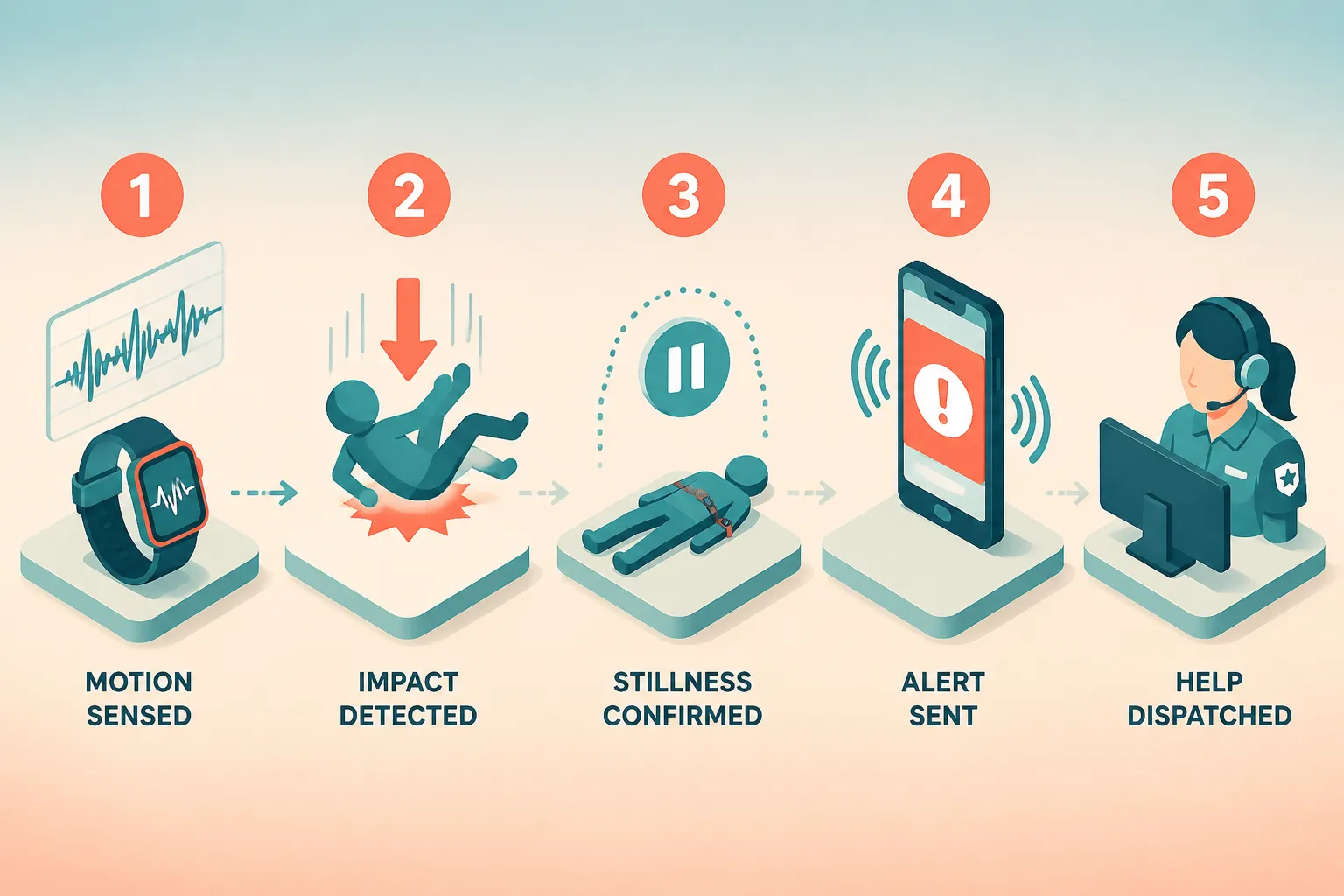
Fall alert wearables require the user to press a button to summon help. Fall detection wearables automatically sense a fall and initiate a call without any user action. Fall detection is critical when the user is unconscious, disoriented, or unable to reach a button.
What's the difference between fall alert and fall detection wearables?

Most premium devices in 2026 offer both: an SOS button for user-initiated help and automatic detection as backup. Fall detection accuracy varies, a 2026 systematic review reported single-sensor systems hitting 80-98% sensitivity, with multi-sensor setups reaching up to 100% sensitivity and 99% specificity in controlled testing.[5] Real-world home performance is typically lower because everyday activities like sitting down heavily can mimic fall signatures.

Do seniors actually need wearables for tracking strength and balance?

Not every senior needs one, but wearables provide meaningful value for adults over 65 with any of these: a fall in the past year, unsteady gait, sarcopenia risk, chronic disease that limits activity, or living alone. For healthy, active 65-year-olds, a basic tracker is enough; frailty screening becomes useful around age 75+.

The evidence base is strong. A April 2026 primary-care study combined wearable IMUs, force-platform balance testing, and grip-strength gauges with WHO ICOPE frailty screening, the resulting frailty estimates broadly matched general practitioner ratings over six months.[3] The catch: pure sensor data missed the psychological and social components of frailty, so wearables complement but don't replace clinical assessment.[3]

Wearables that work without a smartphone for elderly users

Standalone cellular wearables are the answer for seniors who don't own or use a smartphone. These devices have their own SIM (usually 4G LTE) and connect directly to monitoring centers or emergency contacts.

Top no-phone-needed options in 2026:

  • Kanega Watch (UnaliWear), cellular, fall detection, voice commands, medication reminders, no smartphone ever required.
  • Bay Alarm Medical SOS Smartwatch, cellular, GPS, fall detection, 24/7 monitoring center.
  • Medical Guardian MGMove, cellular smartwatch with SOS, step tracking, weather.
  • Lively Mobile Plus, pendant style, urgent response button, fall detection.
  • Apple Watch with Cellular, technically works phone-free after setup but requires a smartphone for initial pairing.

Battery life ranges from about 20 hours (Apple Watch cellular) to multiple days (Kanega, MGMove). For someone who forgets to charge, longer battery matters more than features.

How accurate are wearable fall detection sensors really?

In controlled lab studies, top wearable fall detection systems achieve 95-100% sensitivity, but real-world home accuracy drops to roughly 70-90% because everyday movements produce fall-like signals. Wrist-worn devices are less accurate than hip, ankle, or lower-back sensors for detecting near-falls and actual falls.[5]

Key accuracy takeaways from a June 2026 systematic review:[5]

  • Sensor location matters more than brand, lower-body placements capture cleaner linear acceleration signatures.
  • Multi-sensor systems (e.g., watch + hip clip) approach 100% accuracy in labs.[5]
  • Single wrist sensors miss slow falls and generate false positives during arm swings.
  • Real-home validation is limited, most published sensitivity numbers come from staged falls with young participants.[4]

Practical takeaway: no wearable is perfect. Combine automatic detection with a manual SOS button and, ideally, a monitoring center subscription.

Best wearable for tracking daily mobility and activity in seniors

For daily mobility tracking specifically, the Apple Watch SE 2nd gen and Fitbit Charge 6 lead for tech-comfortable seniors, while the Kanega Watch wins for seniors who need standalone cellular and simpler interfaces.

Metrics that matter more than step count for older adults:

  • Walking steadiness (Apple Health), low/OK/very-low categories flag fall risk.
  • Cardio load and readiness (Fitbit/Pixel Watch), balances activity with recovery.
  • Active Zone Minutes, more meaningful than raw steps for seniors with slower gait.
  • Stand hours / hourly movement reminders, reduce sedentary time.

A 2025 trial using wearable-assisted walking in older adults with sarcopenia showed measurable gains in handgrip strength, sit-to-stand performance, and skeletal muscle index, evidence that structured wearable programs beat unstructured step counting.[2]

Can you wear fall detection wearables in the shower or pool?

Most 2026 senior wearables are shower-safe but not all are pool-safe. Bathroom falls are among the most common and most serious for older adults, so shower compatibility is non-negotiable.

Quick water rating guide:

  • Apple Watch Series 9 / SE / Ultra, swim-proof (WR50 / 100m).
  • Kanega Watch, shower-safe (IPX7).
  • Bay Alarm SOS Smartwatch, shower-safe.
  • Medical Guardian MGMove, shower-safe (IPX7).
  • Lively Mobile Plus pendant, shower-safe.
  • Fitbit Charge 6, swim-proof (50m).

Common mistake: taking off a wearable before showering "just in case." Bathrooms account for a large share of senior falls. Confirm the IPX or WR rating and wear it in the shower.

What features matter most in senior health wearables?

The five features that matter most in 2026: automatic fall detection, one-button SOS, GPS location sharing, standalone cellular (if no smartphone), and long battery life. Fitness metrics are secondary to safety and reliability.

Priority feature checklist:

  1. Automatic fall detection with adjustable sensitivity
  2. Manual SOS button that's physically distinct and easy to press
  3. GPS or location services so responders find the user
  4. Cellular (LTE) option for phone-free operation
  5. Water resistance to at least IPX7 (shower-safe)
  6. Battery life of at least 18 hours; ideally days
  7. Heart rate and irregular rhythm alerts (bonus)
  8. Medication reminders (bonus)
  9. Caregiver dashboard / family app for remote monitoring
  10. Large, high-contrast display for aging eyes

Are medical alert systems better than wearable trackers for fall risk?

For high-risk seniors, traditional medical alert systems with 24/7 monitoring centers are more reliable than consumer fitness wearables because a trained operator responds within seconds, not minutes. But modern hybrid smartwatches (Kanega, MGMove, Bay Alarm SOS) close much of that gap while adding activity tracking.

Quick decision guide:

  • Traditional medical alert (Life Alert, Philips Lifeline, Medical Guardian classic pendant), best for cognitively impaired seniors, users who won't wear a watch, or those wanting the lowest monthly cost with a monitoring center.
  • Hybrid medical smartwatch (Kanega, MGMove, Bay Alarm SOS), best when the user wants safety plus activity tracking and cellular independence.
  • Consumer smartwatch (Apple Watch, Pixel Watch), best for tech-comfortable, active seniors who accept some monitoring gaps in exchange for full fitness features.

FAQ

Do Medicare or Medicare Advantage plans cover senior wearables?
Traditional Medicare does not cover wearables. Some Medicare Advantage plans reimburse for medical alert devices or offer discounts on Apple Watch or Fitbit through wellness benefits, check plan-specific details.

What's the best wearable for a senior with dementia?
A dedicated GPS pendant or smartwatch with geofencing and standalone cellular, like the Theora Connect or Medical Guardian Mobile 2.0. Consumer smartwatches are usually too complex for later-stage dementia.

Can wearables predict falls before they happen?
Not reliably yet, but gait-instability trends over weeks can flag rising risk. Near-fall detection research is advancing quickly, with 2026 studies showing 80-98% sensitivity for single-sensor near-fall detection in labs.[5]

How often should the data be reviewed?
Caregivers should check trends weekly. Clinicians typically review at 3- or 6-month intervals when using wearables for frailty monitoring.[3]

Do these devices work without Wi-Fi?
Cellular-enabled devices (Kanega, MGMove, Apple Watch Cellular) work anywhere with LTE coverage. Non-cellular trackers need either Wi-Fi or a paired phone.

Is a smart ring like Oura useful for seniors?
Smart rings track sleep, heart rate, and recovery well but do not offer fall detection or SOS. They complement rather than replace a fall-risk device.

How long do the batteries last?
Apple Watch and Pixel Watch: 18-36 hours. Fitbit Charge 6: 5-7 days. Kanega and MGMove: 1-2 days. Traditional pendants: 3-5 years (non-rechargeable).

Can family members monitor the data remotely?
Yes. Apple Health sharing, Fitbit family accounts, and dedicated caregiver dashboards from Kanega, Bay Alarm, and Medical Guardian all support remote monitoring with the senior's consent.

Conclusion

The top wearables for tracking strength, mobility, and fall risk in seniors in 2026 aren't one-size-fits-all. Active seniors get the most from an Apple Watch SE or Pixel Watch 2. Frail or non-tech seniors are safer with a Kanega Watch, Bay Alarm SOS, or Medical Guardian device. High-risk users benefit from combining a wrist wearable with a hip- or lower-back IMU sensor, which the research clearly shows is more accurate for gait and near-fall detection.[5]

Next steps:

  1. Assess risk first. Ask: has the senior fallen in the past year? Do they live alone? Do they use a smartphone daily?
  2. Match device to risk level. Low risk → consumer smartwatch. Moderate risk → hybrid medical smartwatch. High risk → dedicated system with monitoring center.
  3. Enable fall detection during setup. It's often off by default under age 55.
  4. Set up caregiver sharing so family sees trends, not just emergencies.
  5. Review data quarterly with a clinician who can pair sensor data with a full frailty assessment.[3]

The best wearable is the one the senior actually wears every day, including in the shower. Prioritize comfort, simplicity, and reliable emergency response above feature count.

References

[1] Metrics – https://formative.jmir.org/2025/1/e63928/metrics
[2] PMC12978260 – https://pmc.ncbi.nlm.nih.gov/articles/PMC12978260/
[3] formative.jmir – https://formative.jmir.org/2025/1/e63928/PDF
[4] Full – https://www.frontiersin.org/journals/aging/articles/10.3389/fragi.2026.1695517/full
[5] pubmed.ncbi.nlm.nih.gov – https://pubmed.ncbi.nlm.nih.gov/40604455/

Best Balance Aids and Tools for Seniors: From Simple Supports to Smart Gadgets

Best Balance Aids and Tools for Seniors: From Simple Supports to Smart Gadgets

Last updated: August 18, 2026

Quick Answer

The best balance aids for seniors combine a properly fitted physical support (cane, rollator, or grab bar) with a smart safety device (fall-detection watch or pendant) and, when needed, at-home training tools like stability pads or smart balance trainers. Choose based on how much support you need, whether you fall or feel unsteady, and your comfort with technology. Most older adults benefit from layering simple supports with a monitored fall-detection device, since falls affect about 1 in 4 U.S. adults 65+ every year.[2]

Key Takeaways

  • About 14 million U.S. adults 65+ fall each year, and fall death rates rose 21% between 2018 and 2024.[1][2]
  • Canes suit mild unsteadiness; rollators are better for longer distances and outdoor stability.
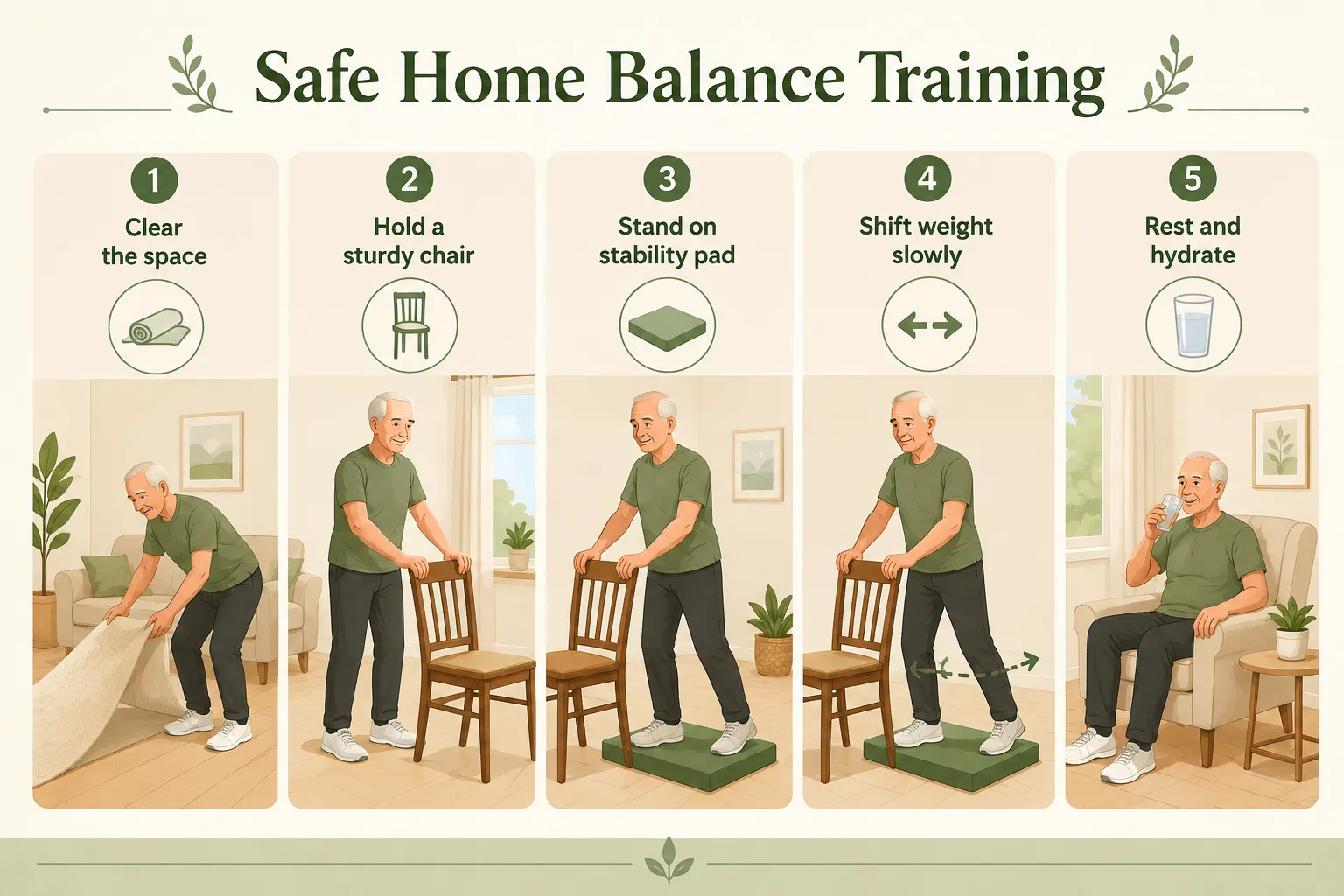
  • Stability pads and balance boards build ankle strength but should be used seated or with a wall/chair for safety.
  • Smart balance trainers use sensors and apps to coach posture and detect drift in real time.
  • Apple Watch and dedicated medical-alert devices offer automatic fall detection with 24/7 alerts.
  • Balance aids work best inside a broader fall-prevention plan that includes exercise and medication review.[3][5]
  • Medicare covers medically necessary walkers and canes with a doctor's prescription; smart gadgets are usually out-of-pocket.
  • Physical therapy is often more effective than any single device for restoring true balance function.[5]

What Are the Best Balance Aids for Seniors?

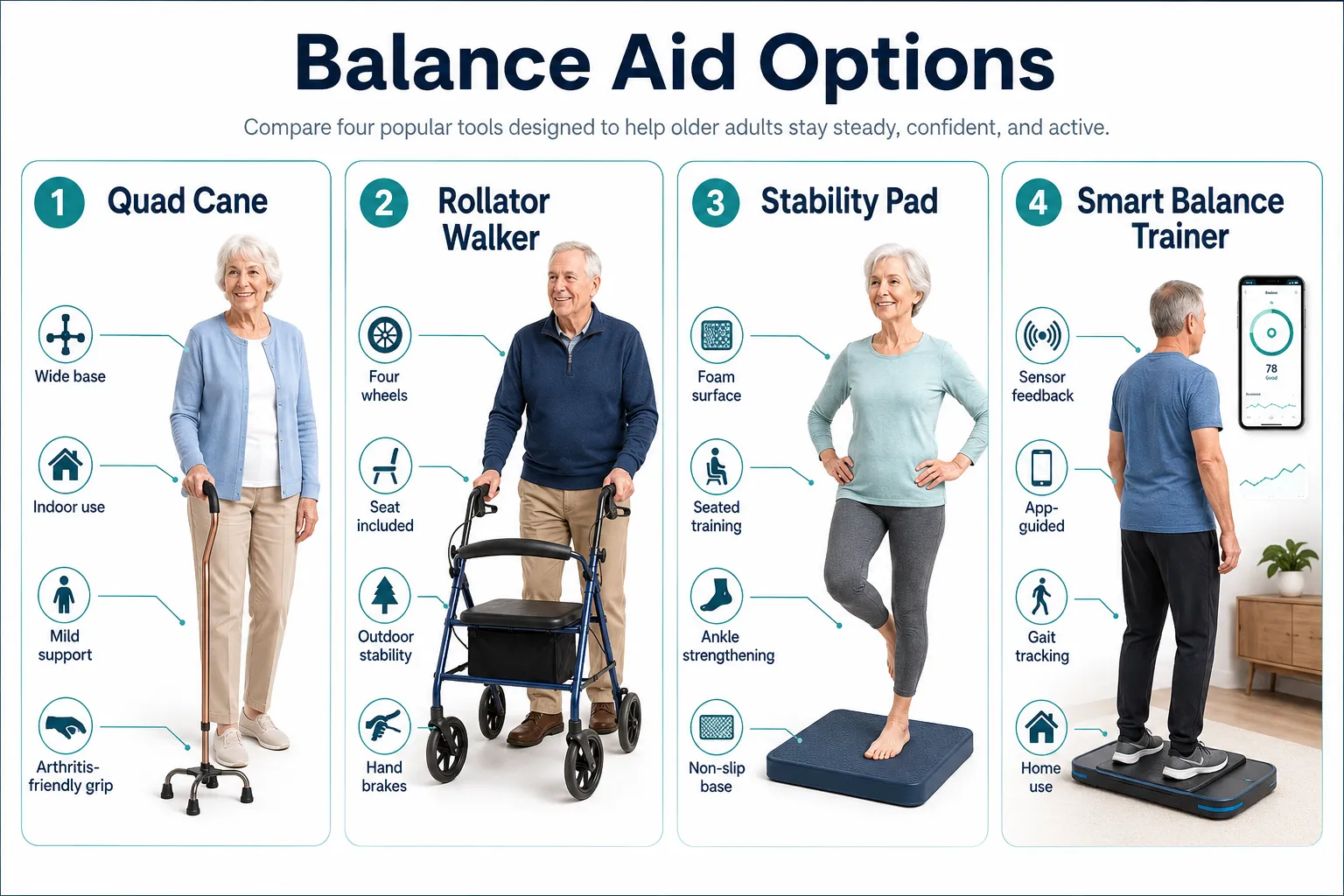
The best balance aids for seniors fall into four categories: simple mobility supports (canes, walkers, rollators), training tools (balance boards, stability pads), smart mobility gadgets (canes with built-in stabilizers, sensor-equipped walkers), and smart safety wearables (fall-detection watches and pendants). Which one is "best" depends on the user's strength, gait, cognitive comfort with tech, and whether the goal is daily support, training, or emergency backup.

What Are the Best Balance Aids for Seniors?

Here's how the four main categories compare:

Category Best for Example tools Typical cost
Simple supports Daily walking, weight-bearing Quad cane, rollator, grab bars $20,$300
Training tools Ankle strength, proprioception Foam pad, wobble board $20,$80
Smart mobility Gait tracking, outdoor safety AI cane, sensor walker $150,$600
Smart safety wearables Fall detection, emergency alerts Apple Watch, medical-alert pendant $30,$85/mo

Choose simple supports if: you feel occasionally unsteady but walk on your own most days.
Choose smart wearables if: you live alone, have fallen before, or worry about not reaching a phone after a fall.
Choose training tools if: your therapist has cleared you for home balance exercises.

How Do Balance Aids Help Prevent Falls in Older Adults?

Balance aids prevent falls by widening the base of support, offloading weight from weakened joints, and giving the user a stable point of contact that compensates for slower reflexes. Smart devices add a second layer: they detect a fall in progress and call for help faster than a human could dial 911.

Falls are the leading cause of injury-related death for U.S. adults 65+, and the age-adjusted fall death rate rose from 64.7 per 100,000 in 2018 to 78.4 per 100,000 in 2024.[1] Every year, roughly 3 million older adults visit emergency departments after a fall.[2] A well-fitted cane or rollator reduces sway and gives users confidence to keep moving, which matters, because inactivity from fear of falling is itself a major risk factor.

The NICE NG249 guideline (updated 2025) and APTA Geriatrics clinical practice guideline both recommend assistive devices as part of a multifactorial prevention plan that also includes strength/balance exercise, medication review, and home hazard checks.[3][5] Aids alone are not enough, but skipping them raises risk.

Difference Between a Cane, Walker, and Rollator for Balance

A cane offers light support for one side; a walker offers heavy four-point support but must be lifted or pushed; a rollator rolls on wheels, includes hand brakes and usually a seat, and works best for people who tire quickly.

  • Single-point cane: minimal support, best for mild unsteadiness or offloading one sore knee.
  • Quad cane: four-tipped base, stands on its own, good for post-stroke or one-sided weakness.
  • Standard walker (no wheels): maximum stability, but slow and requires upper-body strength to lift.
  • Two-wheel walker: slides forward, easier than lifting, moderate stability.
  • Rollator (3 or 4 wheels): fastest and most versatile; hand brakes required; includes a seat for rest breaks.

Decision rule: If you can walk without holding furniture but feel wobbly, start with a cane. If you need both hands for support or feel your legs "give," use a walker. If you go longer distances but need to sit often, choose a rollator.

Common mistake: using a cane on the same side as the weak leg. The cane should go in the opposite hand from the weaker leg to properly shift weight.

Best Smart Balance Devices for Seniors with Technology

The best smart balance devices for seniors in 2026 include the Apple Watch Series 11 and Ultra 3 (built-in fall detection with no extra fee), dedicated medical-alert watches like the Kanega Watch, AI-enabled smart canes like the Wander On Assist 01 and Lgenie voice-activated cane, and smart balance trainers that pair a sensor pad with a phone app for guided workouts.

Best Smart Balance Devices for Seniors with Technology

Key smart features to look for:

  • Automatic fall detection using accelerometers and gyroscopes
  • Multi-step alert workflow: local alarm → contact family → escalate to 911
  • GPS location sharing for outdoor safety
  • Long battery life (multi-day or easy overnight charging)
  • Comfort: wrist wear improves adherence over neck pendants for most users

Independent testing found that the Medical Guardian MGMini Lite detected about 80% of test falls and connected to help in roughly 8 seconds, while Bay Alarm Medical's SOS pendant detected about 70%. Apple Watch's fall detection triggers emergency calls if the user doesn't respond within 60 seconds after a hard fall.

A 2026 systematic review of near-fall wearable sensors found IMU-based systems achieved 80-98% sensitivity with a single sensor, and up to 100% sensitivity with multi-sensor setups, evidence that smart wearables are becoming genuinely predictive, not just reactive.

How Much Do Balance Aids Cost for Seniors?

Balance aid costs range from about $20 for a basic cane to $600+ for AI-enabled smart canes, plus monthly fees of $30,$85 for monitored fall-detection services.

Typical price ranges:

  • Standard cane: $15,$50
  • Quad cane: $25,$70
  • Rollator: $80,$300
  • Grab bars (installed): $30,$150 each
  • Foam stability pad: $20,$60
  • Balance board: $25,$100
  • Apple Watch SE (with fall detection): ~$249, no monthly fee for fall detection
  • Medical-alert pendant with fall detection: monitoring plans typically ~$30,$45/mo, with fall detection often a ~$10/mo add-on
  • Kanega Watch: subscription plans around $65,$85/mo, fall detection included
  • AI smart canes (Lgenie, Wander On Assist 01): $200,$600 one-time

Common mistake: assuming fall detection is included in every medical-alert plan. Most brands charge it as an add-on.

Balance Aids for Seniors with Arthritis or Joint Pain

For seniors with arthritis, the best balance aids feature cushioned or ergonomic grips, shock-absorbing tips, and light frames that reduce hand and shoulder strain. Rollators are often preferred over standard walkers because they don't require lifting.

Recommendations by joint issue:

  • Hand/wrist arthritis: foam or gel palm grips, offset canes that distribute pressure across the palm
  • Knee arthritis: rollator with a seat for rest breaks, or a cane in the opposite hand to offload the sore knee
  • Hip arthritis: four-wheel rollator to reduce twisting, plus a raised toilet seat and shower chair at home
  • Shoulder pain: avoid standard walkers (require lifting); choose two-wheel or four-wheel models

Look for canes with shock-absorbing shafts, several smart canes now include this feature alongside built-in stabilizer bases.

What Balance Aid Is Best for Someone Just Starting to Need Support?

For someone just starting to feel unsteady, the best first balance aid is usually a properly fitted single-point cane paired with a fall-detection smartwatch or pendant. This combination provides light physical support without over-relying on equipment, plus a safety net if a fall happens.

Start-up checklist:

  1. Get a physical therapy or primary care assessment first, NICE guidelines recommend this before choosing a device.[3]
  2. Have the cane sized: top of the cane should reach the crease of your wrist when arms hang straight.
  3. Practice on level ground before using stairs or uneven surfaces.
  4. Add a smart safety wearable if you live alone or have fallen in the past year.
  5. Start balance exercises 2-3 times per week (chair-supported at first).

Choose a rollator instead if: you need to sit down often, get short of breath, or feel your legs might buckle.

Can Balance Aids Help with Vertigo or Dizziness in Seniors?

Balance aids can help seniors manage vertigo and dizziness by providing a stable point of contact during episodes, but they don't treat the underlying cause. Anyone with recurring vertigo should also see a doctor to rule out inner-ear disorders, medication side effects, or blood pressure issues.

Useful tools during dizzy spells:

  • Rollator with brakes and seat: lets you sit immediately if a spell hits
  • Grab bars in bathroom and near the bed: most dizzy episodes happen during position changes
  • Bedside cane or walker: for the first steps after standing up
  • Smart balance trainers with app guidance: vestibular exercises (like head-turn drills) may reduce vertigo frequency when prescribed by a therapist

Edge case: if dizziness comes with sudden hearing loss, chest pain, or slurred speech, call 911, that's not a balance-aid problem.

Balance Aids for Seniors Living Alone at Home

Seniors living alone need redundant safety layers: a physical support device, a fall-detection wearable worn continuously, and home modifications that reduce fall risk in the first place.

Priority setup for solo living:

  • Wearable with automatic fall detection (Apple Watch, Kanega Watch, or monitored pendant)
  • Grab bars in shower, next to toilet, and by the bed
  • Non-slip mats in bathroom, no throw rugs anywhere
  • Motion-activated night lights on the path to the bathroom
  • Rollator or walker kept at bedside if nighttime steadiness is poor
  • Smart speaker (Amazon Echo, Google Home) with emergency contacts programmed for voice-activated calling

A wearable that stays on the wrist beats a pendant left on the nightstand. Adherence matters more than sensor accuracy.

Common Mistakes Seniors Make When Using Balance Aids

The most common mistakes with balance aids are using the wrong height, holding the cane in the wrong hand, not replacing worn rubber tips, and treating the aid as a substitute for exercise rather than a supplement to it.

Top mistakes to avoid:

  1. Cane too tall or too short, check that your elbow bends about 15-20 degrees when holding it.
  2. Cane on the weak side, always use it in the hand opposite the weaker leg.
  3. Leaning too far forward on a walker, this shifts your center of gravity outside the frame and increases fall risk.
  4. Worn rubber tips, replace every 6-12 months; worn tips slip on smooth floors.
  5. Skipping strength training, no device replaces stronger leg and core muscles.
  6. Wearing a fall-detection pendant only during the day, most falls happen at night or in the bathroom.
  7. Not locking rollator brakes before sitting, a moving seat is a serious fall hazard.

Balance Aids vs Physical Therapy for Improving Senior Balance

Physical therapy improves the underlying balance system (strength, proprioception, reaction time), while balance aids provide external support for tasks the body can't yet handle safely. The two work together, they're not substitutes.

Balance Aids vs Physical Therapy for Improving Senior Balance

APTA Geriatrics' 2025 clinical practice guideline recommends structured physical therapy for gait, strength, and balance in community-dwelling adults 65+, combined with environmental changes and assistive devices as needed.[5] Therapy typically produces measurable gains in 8-12 weeks; a cane produces stability instantly but doesn't rebuild the muscles.

Choose therapy first if: you're deconditioned but medically stable and can attend sessions.
Choose an aid first if: you're actively at high fall risk and can't wait 8+ weeks to feel steadier.
Best result: do both, therapy plus properly prescribed aids.

Best Balance Aids for Seniors with Limited Upper Body Strength

Seniors with limited arm or grip strength should choose lightweight rollators, wheeled walkers, or canes with ergonomic grips rather than standard walkers that require lifting.

Top picks by strength limitation:

  • Weak grip: foam-padded or molded ergonomic cane grips; loop-style rollator brakes instead of squeeze levers
  • Weak arms: four-wheel rollator (no lifting required), or a wheeled walker with glide skis
  • Weak shoulders: avoid pendulum-style standard walkers; use rollators with forearm supports if needed
  • Poor coordination: rollator with locking brakes and a wide, stable base

Some AI smart canes now include voice control so users don't need to reach for a phone to summon help, helpful when hands are already busy stabilizing.

Do Insurance or Medicare Cover Balance Aids for Seniors?

Medicare Part B typically covers medically necessary canes, walkers, and rollators as durable medical equipment (DME) when prescribed by a doctor and supplied by a Medicare-enrolled provider. You'll usually pay 20% after the deductible. Smart gadgets, medical-alert subscriptions, and balance trainers are generally not covered by Original Medicare, though some Medicare Advantage plans include limited allowances.

Coverage snapshot:

  • Covered (with prescription): standard canes, quad canes, walkers, rollators, commode chairs, grab bars in some cases
  • Sometimes covered by Advantage plans: medical-alert systems, home modification allowances
  • Rarely covered: smart canes, Apple Watch, balance boards, stability pads
  • Veterans: the VA often covers a wider range of assistive devices; check with your VA benefits coordinator

Tip: always ask your doctor for a written prescription and get the equipment from a Medicare-approved supplier, otherwise the claim will be denied.

Balance Aids for Outdoor Use vs Indoor Use for Seniors

Indoor balance aids prioritize maneuverability in tight spaces (single-point canes, narrow walkers), while outdoor aids need larger wheels, better brakes, and weather-resistant materials to handle sidewalks, curbs, and gravel.

Indoor aids:

  • Single-point or quad cane
  • Narrow-frame two-wheel walker
  • Grab bars, bed rails, raised toilet seats

Outdoor aids:

  • Four-wheel rollator with 8-inch or larger wheels
  • All-terrain rollator for grass and gravel
  • Smart cane with GPS and fall detection
  • Fall-detection watch with cellular connection (works away from home Wi-Fi)

Decision rule: if you use the same device inside and out, pick a rollator with medium wheels (6-7 inches) as a compromise, but expect it to feel slightly bulky indoors.

FAQ

What's the safest first balance aid for a senior who has never used one?
A properly fitted single-point cane, chosen with input from a physical therapist or doctor. Add a fall-detection wearable if the senior lives alone.

Are smart canes worth the money?
For tech-comfortable seniors who walk outdoors and want gait tracking or voice-activated help, yes. For basic indoor support, a standard cane at a fraction of the cost is fine.

Can Apple Watch really detect a fall?
Yes. Apple Watch Series 4 and newer include automatic fall detection that calls emergency services if you don't respond within 60 seconds after a hard fall.

Do I need a prescription for a walker or rollator?
Not to buy one, but Medicare requires a doctor's prescription to cover it.

How often should rubber cane tips be replaced?
Every 6-12 months, or immediately if the tread looks worn or the tip feels slick on smooth floors.

Are balance boards safe for seniors?
Only with supervision or a sturdy support (chair, wall) within reach. Many seniors do better with foam stability pads, which are safer than wobble boards.

What's the difference between a medical-alert pendant and a smartwatch with fall detection?
Pendants connect to a 24/7 monitoring center; smartwatches usually contact preset emergency contacts and 911 directly. Both work, adherence and comfort determine which is better for you.

Can balance aids fully prevent falls?
No device eliminates fall risk. The best results come from combining aids with exercise, medication review, vision checks, and home safety changes.[3][5]

Conclusion

The best balance aids and tools for seniors aren't picked from a top-10 list, they're matched to the person. Start with an honest assessment of unsteadiness, then layer supports: a properly fitted cane or rollator for daily use, a fall-detection watch or pendant for emergencies, and simple training tools if a therapist clears you for home practice. Medicare covers the basics; smart gadgets are usually worth their extra cost only if they'll actually be worn every day.

Next steps this week:

  1. Book a fall-risk assessment with your doctor or a physical therapist.
  2. Check that any current cane or walker is the right height and has fresh tips.
  3. Add one home safety upgrade, grab bar, night light, or non-slip mat.
  4. Decide on a fall-detection wearable and set up emergency contacts today.
  5. Start 10 minutes of chair-supported balance exercises three times a week.

Falls are common, but they're not inevitable. The right mix of simple supports and smart tools, used consistently, alongside exercise and good medical care, dramatically shifts the odds in your favor.

References

[1] Falls Data and Research – https://www.cdc.gov/falls/data-research/index.html
[2] Older Adult Falls Facts and Stats – https://www.cdc.gov/falls/data-research/facts-stats/index.html
[3] NICE Guideline NG249: Falls in older people – https://www.nice.org.uk/guidance/ng249
[4] APTA: Falls in Older People (NICE NG249) – https://www.apta.org/patient-care/evidence-based-practice-resources/cpgs/falls-in-older-people-assessing-risk-and-prevention-nice-ng249
[5] APTA: Physical Therapy Management of Fall Risk in Community-Dwelling Older Adults – https://www.apta.org/patient-care/evidence-based-practice-resources/cpgs/physical-therapy-management-of-fall-risk-in-community-dwelling-older-adults
[6] WHO: Falls Fact Sheet – https://www.who.int/news-room/fact-sheets/detail/falls
[7] CDC STEADI Patient Resources – https://www.cdc.gov/steadi/patient-resources/index.html
[9] NSC: Older Adult Falls – https://injuryfacts.nsc.org/home-and-community/safety-topics/older-adult-falls/
[10] CDC: Common Injuries As We Age – https://www.cdc.gov/still-going-strong/about/common-injuries-as-we-age.html