Last updated: September 1, 2026
Quick Answer
The best exercise apps for seniors in 2026 combine evidence-based balance training, gentle strength work, and mobility routines that run on a standard smartphone. Top picks include SilverSneakers GO, Bold, StandingTall, Stay Steady, Apple Fitness+, GentleFit, and Golden Moves, with free options like Eldergym for follow-along videos. Choose an app that uses proven protocols (Otago, A Matter of Balance), offers video demonstrations, and adapts intensity to your fitness level.[1][2][6][8]
Key Takeaways
- Senior-specific apps outperform mainstream fitness apps for adults 65+ because they emphasize safety cues, chair options, and progressive balance work.[1][2]
- Clinically-backed programs matter: apps built on the Otago Exercise Programme or A Matter of Balance have documented fall-reduction results.[6][8][22]
- A 2026 mHealth review found app-based fall prevention produced an 11% relative reduction in falls over 12 months, with no serious adverse events.[22]
- Balance and strength together work best, apps focusing on only one dimension leave key fall-prevention benefits on the table.[19][22]
- Free options exist (Eldergym, SilverSneakers GO with Medicare Advantage), but paid apps typically offer more coaching and progression.[1][2]
- Look for video demonstrations, large text, adjustable pace, and offline mode before signing up.
- Wearable integration (Apple Watch, Fitbit) improves adherence by tracking steps, heart rate, and workout completion.
What Are the Best Exercise Apps for Seniors in 2026?
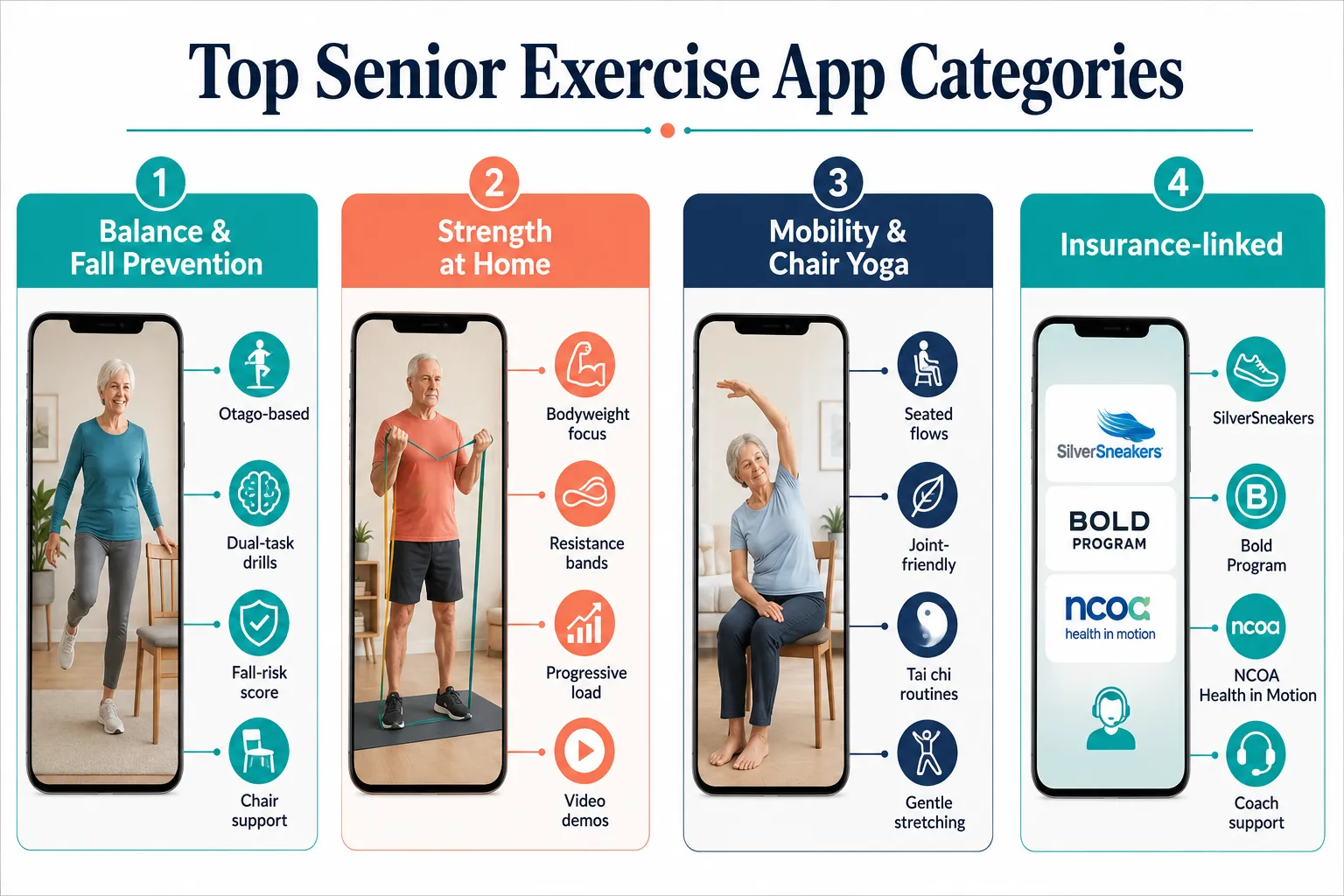
The best exercise apps for seniors combine guided video sessions, balance-focused programming, and a simple interface designed for older users. Consumer roundups updated in August 2026 consistently rank SilverSneakers GO, Bold, StretchPartner, Apple Fitness+, Pvolve, GentleFit, and Golden Moves as leaders for home strength, mobility, and balance training.[1][2][4][5]
)
Here's how the standouts break down:
| App | Best For | Cost (2026) | Key Feature |
|---|---|---|---|
| SilverSneakers GO | Medicare Advantage members | Free with benefit | Live and on-demand classes |
| Bold | Fall prevention | Free tier + premium | Personalized balance program |
| StandingTall | Clinical balance training | Free (research-backed) | 20% fall injury reduction data[8] |
| Stay Steady | Home balance assessment | Free/low-cost | Otago-based + TUG test[6] |
| Apple Fitness+ | All-around low-impact | $9.99/mo | Deep Apple Watch integration |
| GentleFit | Adults 50+ new to exercise | Freemium | Simple navigation, low-impact[4] |
| Golden Moves | Adults 65+ at home | Freemium | No-equipment routines[5] |
| Eldergym | Free follow-along | Free | YouTube-style video library |
Choose SilverSneakers if you have Medicare Advantage, it's essentially free. Choose Bold or StandingTall if falls or balance are your main concern. Choose Apple Fitness+ if you already wear an Apple Watch.
How Do Exercise Apps Help With Balance and Fall Prevention?
Exercise apps reduce fall risk by delivering structured balance and strength routines proven in clinical trials, often based on the Otago Exercise Programme or A Matter of Balance. A 2026 systematic review of mHealth fall-prevention apps reported an 11% relative reduction in the proportion of older adults experiencing a fall over 12 months, with a number-needed-to-treat of 15.[22]
Specific results from the research literature:
- StandingTall: clinically proven to reduce injuries from falls by 20%.[8]
- Safe Step app trial: only 11% of participants in the app group experienced a fall during the intervention.[21]
- Bold Fall Prevention Program: 46% reduction in annualized falls per year and a 182% increase in weekly activity minutes.[18]
- Community telehealth reviews: a risk ratio of 0.63 for falls (a 37% relative reduction).[23]
How they work in practice: most apps combine single-leg stands, tandem walking, sit-to-stand repetitions, and dual-task exercises (moving while doing a mental task). Nymbl Training specifically uses dual-task drills that pair balance moves with brain challenges.[9]
A well-designed app can replicate the core mechanics of a supervised balance class, delivered in your living room, at the times that work for you.
Common mistake: treating an app as a substitute for a physical therapist after a recent fall or surgery. Always get medical clearance first.
Can Seniors Build Muscle With Home Workout Apps?
Yes, seniors can build meaningful strength using home workout apps, especially those featuring progressive bodyweight movements, resistance bands, and light dumbbells. Apps like Pvolve, Apple Fitness+, SilverSneakers GO, and Strong Foundations (UC San Diego's 12-week online program) emphasize posture, functional strength, and balance in the same session.[1][19]
What to look for in a strength-focused app:
- Progressive overload, sessions that gradually increase reps, sets, or resistance.
- Compound movements, sit-to-stand, wall push-ups, band rows, and step-ups translate directly to daily life.
- Two to three sessions per week, the strength dosage most guidelines recommend for older adults.
- Rest and recovery guidance built into the schedule.
The Strong Foundations program at UC San Diego, delivered once weekly over 12 weeks online, demonstrated improved balance, posture, and strength with real-time semi-individualized coaching.[19] Similar structure appears in Bold's premium tier and Apple Fitness+'s strength collections for older adults.
Best Free Exercise Apps for Older Adults
The best free exercise apps for seniors include SilverSneakers GO (free with most Medicare Advantage plans), Eldergym (free follow-along videos), StandingTall (free clinical program), and free tiers of Bold, Nymbl Training, and GentleFit.[1][2][8]
Free options worth downloading first:
- SilverSneakers GO, full class library if eligible.
- Bold (free tier), a personalized plan and starter balance sessions.
- StandingTall, full research-grade balance program at no cost.[8]
- Eldergym Senior Fitness, free follow-along videos with a coach.[2]
- Nymbl Training, dual-task balance training, often offered free through state health departments.
Decision rule: start with a free app for the first 30 days. If you use it three times a week and want more variety, upgrade to a paid option.
Exercise Apps for Seniors With Arthritis or Joint Pain
For seniors with arthritis or joint pain, the safest apps focus on low-impact, chair-based, or water-alternative movements with clear modifications. StretchPartner (chair-first mobility), Chair Yoga Tai Chi Fitness, GentleFit, Golden Moves, and SilverSneakers GO all specialize in joint-friendly routines.[1][3][4][5]
)
Tai chi and qigong apps have grown especially fast, a 2026 landscape analysis found 16 tai chi/qigong apps for seniors, several of which surpassed 1,300 ratings within months of launch.[3] Tai chi's slow, weight-shifting patterns are ideal for stiff knees, hips, or shoulders.
Features that matter for arthritis:
- Warm-up routines that are 5+ minutes long.
- Seated modifications for every standing exercise.
- Range-of-motion drills instead of high reps.
- The ability to slow the video down.
Skip apps that default to HIIT, plyometrics, or floor-based routines with no chair alternative.
How Much Do Senior Fitness Apps Cost?
Senior fitness apps typically cost between $0 and $15 per month, though specialized AI-guided or tai chi apps can run $19.99 to $99.99 per year.[3] Many quality options are free through insurance benefits or nonprofit partnerships.
Typical 2026 pricing:
- Free tier apps: SilverSneakers GO (with Medicare Advantage), StandingTall, Eldergym, Bold free tier.
- Budget ($4,$9/mo): GentleFit, Golden Moves, Stay Steady premium.
- Mid-range ($9.99,$14.99/mo): Apple Fitness+, Pvolve, Bold premium.
- Annual specialty apps: Tai Chi Beginners & Seniors and similar AI-guided tools, $19.99,$99.99/year.[3][13]
Insurance angle: if you have Medicare Advantage, ask your plan about SilverSneakers, Renew Active, or Silver&Fit, these often include app access. The NCOA's Health in Motion program (2026) delivers Otago and A Matter of Balance digitally through health coaches, sometimes at no cost for eligible adults.[26]
Which Exercise Apps Work Offline for Seniors?
Offline access matters for seniors with unreliable Wi-Fi or limited data plans. Apps that allow video downloads for offline playback include Apple Fitness+ (with subscription), SilverSneakers GO (select classes), and Pvolve. Free follow-along programs like Eldergym rely on YouTube, which offers offline downloads with a YouTube Premium subscription.
How to check before subscribing: search the app description for "download" or "offline" and ask customer support directly. Many balance-focused apps like StandingTall and Stay Steady work with cached content once initially loaded.[6][8]
Quick tip: download a full week of workouts on Wi-Fi at home, then use them anywhere without a signal.
Are There Exercise Apps Specifically Designed for Seniors vs General Fitness Apps?
Yes, a distinct category of senior-specific exercise apps now dominates the market. A 2026 landscape analysis identified 79 senior-focused fitness apps, 44 of which were new that year, spanning chair exercise (23 apps), tai chi/qigong (16), all-round workouts (15), and dedicated balance/fall-prevention apps.[3]
Senior-specific apps differ from general fitness apps in four key ways:
- Interface design, larger fonts, higher contrast, simpler navigation.
- Exercise selection, no jumping, minimal floor work, chair alternatives for every move.
- Pacing, slower demonstrations with clear safety cues.
- Content framing, instructors are often older, and the tone assumes zero fitness background.
When general apps still work: if you're an active 65-year-old comfortable with Peloton, Nike Training Club, or Fitbod, those work fine, just skip the plyometric and HIIT programs.
How Do I Know If an Exercise App Is Safe for My Age and Fitness Level?
An exercise app is likely safe if it uses evidence-based protocols, offers video demonstrations, includes safety warnings, and encourages you to consult a healthcare provider before starting.
)
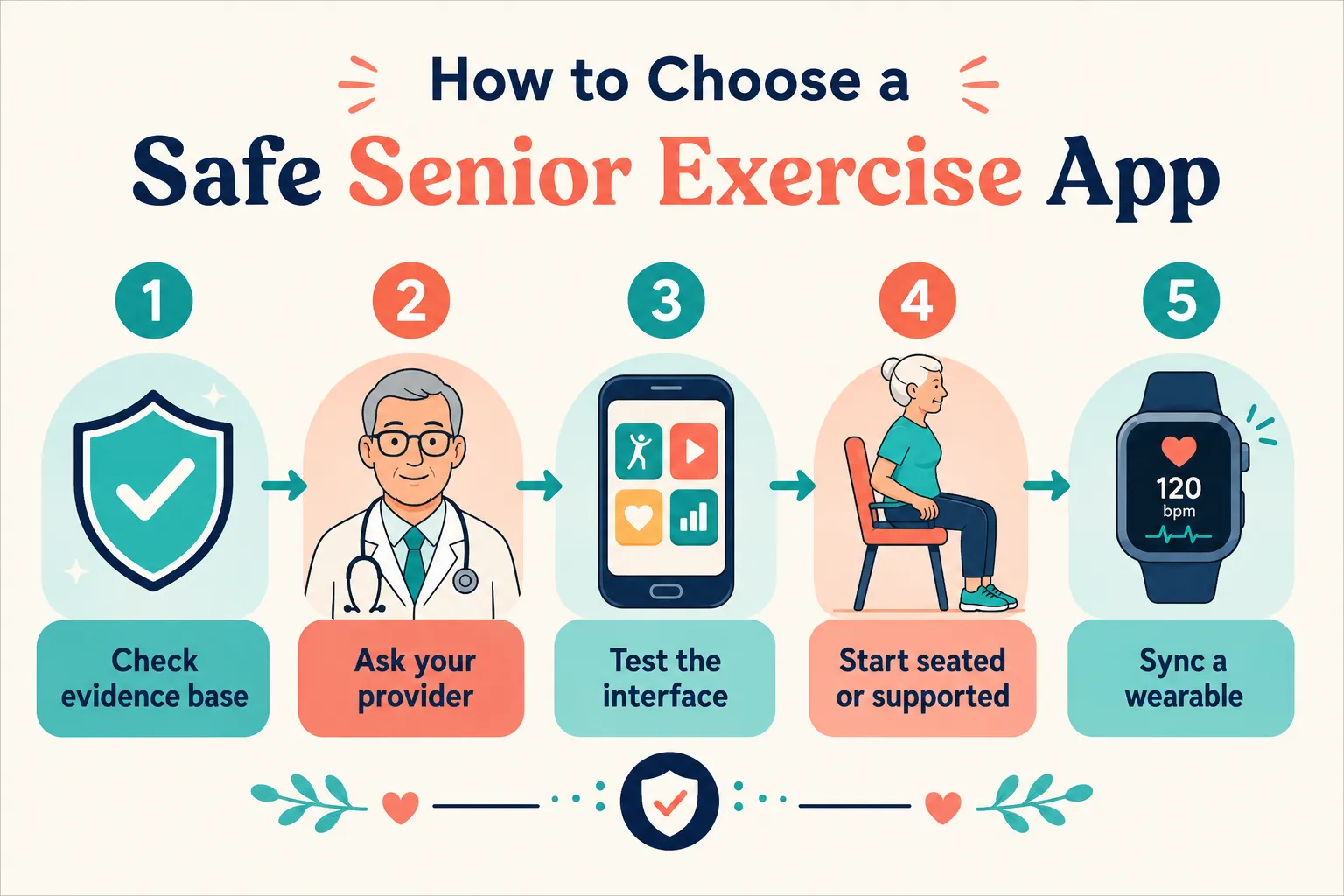
Use this five-step safety check:
- Check the evidence base. Does the app reference Otago, A Matter of Balance, or peer-reviewed research?[6][8][26]
- Ask your provider. Especially if you've had a fall, surgery, or new medical condition in the last year.
- Test the interface. Can you read every button without straining?
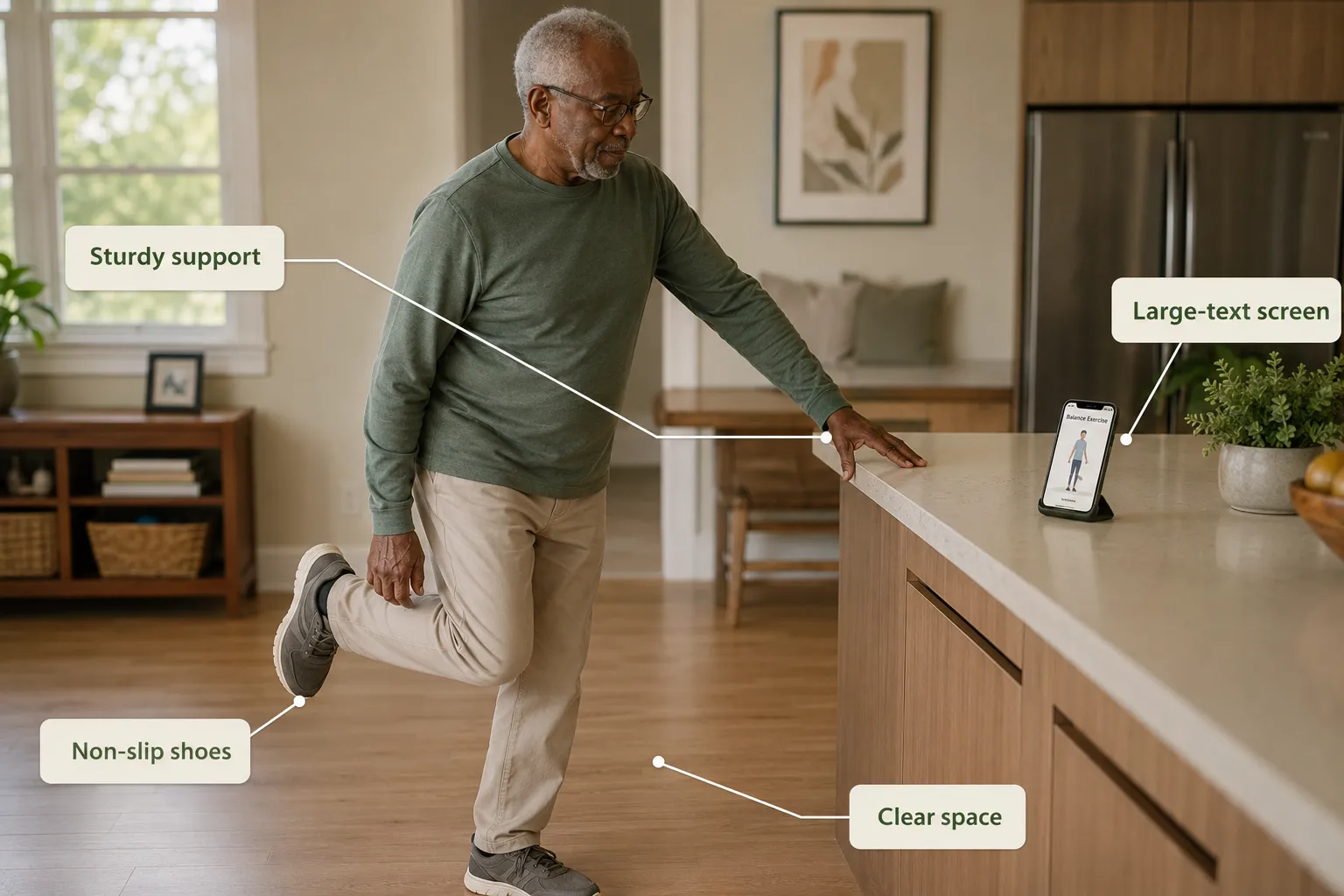
- Start seated or supported. Use a sturdy chair for the first two weeks, even for standing exercises.
- Sync a wearable. Heart rate and step data help you stay in a safe range.
Red flags: no demonstration videos, no safety disclaimers, aggressive marketing promising fast results, or exercises with no seated modification.
Best Apps for Senior Mobility and Flexibility Training
The best apps for senior mobility include StretchPartner (chair-first), Chair Yoga Tai Chi Fitness, Apple Fitness+ Mindful Cooldown, GentleFit, and dedicated tai chi apps that have surged in 2026.[1][3][4]
Mobility apps focus on:
- Joint range of motion (shoulders, hips, ankles, spine).
- Fascial stretching with slow, sustained holds.
- Tai chi and qigong flows for weight shifting and coordination.
- Breathing and posture cues that pair with movement.
Pro tip: stack a 10-minute mobility session before your strength or balance workout. It cuts injury risk and improves how well you can perform the harder moves.
Can Seniors Use Regular Fitness Apps or Do They Need Senior-Specific Ones?
Active, healthy seniors can absolutely use regular fitness apps, as long as they filter for low-impact programs and skip high-intensity content. Seniors with limited mobility, recent injuries, or fall risk should choose senior-specific apps instead.
A quick decision rule:
- Regular apps work if you're already exercising 3+ times a week, have no balance issues, and can safely get up and down from the floor.
- Senior-specific apps are better if you're new to exercise, have arthritis, use a cane or walker, or worry about falling.
Reviews of mainstream apps have found that many fail to meet the needs of frail older adults, lacking personalization and safety adaptations for disability or cognitive limits.[29]
Exercise Apps That Don't Require Equipment at Home
Several strong apps deliver full workouts using only your body weight and a sturdy chair. Top no-equipment picks include Golden Moves, GentleFit, Eldergym, StandingTall, Stay Steady, and most SilverSneakers GO classes.[4][5][6][8]
Movements you can do with zero equipment:
- Sit-to-stand (functional leg strength)
- Wall push-ups (upper body)
- Standing marches (balance + cardio)
- Heel-to-toe walking (dynamic balance)
- Single-leg stands (near a counter for support)
- Chair squats and rows (band optional)
Add a light resistance band (about $10) later if you want to progress upper-body strength.
What Features Should I Look for in a Senior Exercise App?
Prioritize video demonstrations, adjustable pacing, seated alternatives, evidence-based programs, and wearable integration. These features separate genuinely useful senior apps from repackaged general fitness content.
The must-have feature checklist:
- Clear video demonstrations from multiple angles
- Large, high-contrast text and buttons
- Ability to slow down or pause the workout
- Chair or supported version of every standing exercise
- Progress tracking with simple visualizations
- Reminders and motivational coaching
- Integration with Apple Watch, Fitbit, or Google Fit
- Fall-risk assessment (bonus)
- Offline mode (bonus)
- Family/caregiver sharing (bonus)
Research emphasizes that motivational coaching and human support significantly improve adherence, participants in a 12-week digital fall-prevention program specifically valued having a coach layered on top of app content.[17][30]
Do Exercise Apps for Seniors Have Video Demonstrations or Just Text Instructions?
Nearly all quality senior exercise apps use video demonstrations, often the entire session is a follow-along video with an instructor. Text-only apps are outdated and generally unsafe for older users.
What to expect from video-first apps:
- Full follow-along sessions (10-45 minutes).
- Instructor demonstrating both standing and seated versions.
- Verbal safety cues throughout.
- Progress markers on-screen.
Apps with the clearest video quality in 2026: Apple Fitness+, SilverSneakers GO, Pvolve, Bold, and StretchPartner.[1][2] Free options like Eldergym provide solid YouTube-style videos without slick production but with excellent teaching.
Wearable Integration: Why It Matters
Wearables amplify what an app can do by tracking heart rate, steps, sleep, and workout completion. A meta-analysis of six studies with 818 older adults found that digital health app users recorded an average of 799 more steps per day than controls.[20] Another review found activity trackers combined with apps added about 912 steps per day compared with other active interventions.[27]
Best integrations in 2026:
- Apple Watch + Apple Fitness+, deepest integration, on-screen heart rate during workouts.
- Fitbit + SilverSneakers GO, solid tracking of daily activity.
- Google Fit + GentleFit / Golden Moves, basic but reliable step and workout logging.
Frequently Asked Questions
Are exercise apps safe for someone in their 80s?
Yes, if the app is senior-specific and you've been cleared by a healthcare provider. Start with seated or supported exercises and progress slowly.
Can I use an exercise app after hip or knee replacement?
Only with your surgeon or physical therapist's approval. Some apps like Bold and Stay Steady offer post-surgery-friendly modifications, but a licensed professional should guide the first phase of recovery.
How often should seniors use an exercise app?
Aim for balance and mobility work 3-5 days per week and strength training 2-3 days per week, based on general geriatric exercise guidelines.
Do these apps replace a physical therapist?
No. Apps supplement care but don't replace a licensed clinician, especially after a fall or injury. Use them alongside professional guidance.
Which app is best for someone who has fallen before?
Bold, StandingTall, Stay Steady, and Nymbl Training are specifically designed for fall prevention and have documented results in this population.[8][18][22]
Can these apps help with arthritis pain?
Yes, gentle mobility and tai chi apps often reduce stiffness. Chair-based programs are especially helpful for painful joints.[3]
Do I need Wi-Fi to use exercise apps?
Not always. Apple Fitness+, SilverSneakers GO, and Pvolve allow offline downloads. Download workouts at home and use them anywhere.
What's the difference between SilverSneakers and Silver&Fit?
Both are Medicare Advantage fitness benefits with app access. Coverage depends on your specific plan, call your insurer to check.
Are AI-powered senior fitness apps worth it?
Some are. Tools like FallProofAI use gait analysis and computer vision to generate personalized fall-risk scores.[7] They work best as a supplement to a proven exercise program, not a replacement.
Can family members monitor my workouts?
Some apps like Bold and NCOA's Health in Motion allow caregiver dashboards. Ask before subscribing if this feature matters to you.[26]
Conclusion: Next Steps for Choosing Your App
The best exercise apps for seniors in 2026 make evidence-based strength, mobility, and balance training accessible from any smartphone. The market has matured, 79 senior-focused apps now exist, many built on clinical protocols like Otago and A Matter of Balance, with documented fall-reduction results between 11% and 46%.[3][18][22]
Your action plan for this week:
- Pick one free app based on your top goal, Bold or StandingTall for falls, SilverSneakers for all-around fitness, StretchPartner for mobility.
- Get medical clearance if you've had a fall, surgery, or new diagnosis in the last year.
- Commit to 3 sessions in the first week, 15 minutes each, seated or supported.
- Track it with your phone or a wearable so you can see progress.
- Reassess at 30 days. If you're using it, upgrade or explore a second app for variety. If not, try a different one.
Consistency beats intensity. A 15-minute daily balance session done for a year does more for independence than any single perfect workout. Download one app today and take the first session before the week ends.
References
[1] Best Exercise Apps For Seniors – https://stretchpartner.com/blog/best-exercise-apps-for-seniors
[2] Exercise – https://www.seniorliving.org/cell-phone/apps/exercise/
[3] Seniors Fitness – https://www.appaloma.com/research/seniors-fitness
[4] GentleFit Senior Exercise – https://apps.apple.com/us/app/gentlefit-senior-exercise/id6760631535
[5] Golden Moves – https://apps.apple.com/us/app/golden-moves/id6777085453
[6] Stay Steady – https://play.google.com/store/apps/details?id=com.wode.staysteady&hl=en
[7] FallProofAI – https://apps.apple.com/us/app/fallproofai/id6748337594
[8] StandingTall – https://play.google.com/store/apps/details?id=au.org.standingtall.prd&hl=en_US
[9] Game of Falls – https://play.google.com/store/apps/details?id=com.sjinnovation.gameoffalls.live&hl=gsw
[10] Workout for Seniors – SeniorFit – https://apps.apple.com/us/app/workout-for-seniors-seniorfit/id6443794000
