Last updated: August 22, 2026
Quick Answer
AI-powered fitness apps for seniors use your phone or tablet camera to watch how you move, then adjust each workout to match your strength, balance, and mobility. Movement assessment technology maps key joints in real time, flags risky form, and rebuilds your plan as you improve. For older adults exercising at home, this means safer sessions, fewer generic routines, and coaching that actually responds to a stiff hip or a shaky balance day.
Key Takeaways
- Movement assessment technology uses pose estimation to track 17-33 body joints through a standard smartphone camera, no wearables required for most apps.
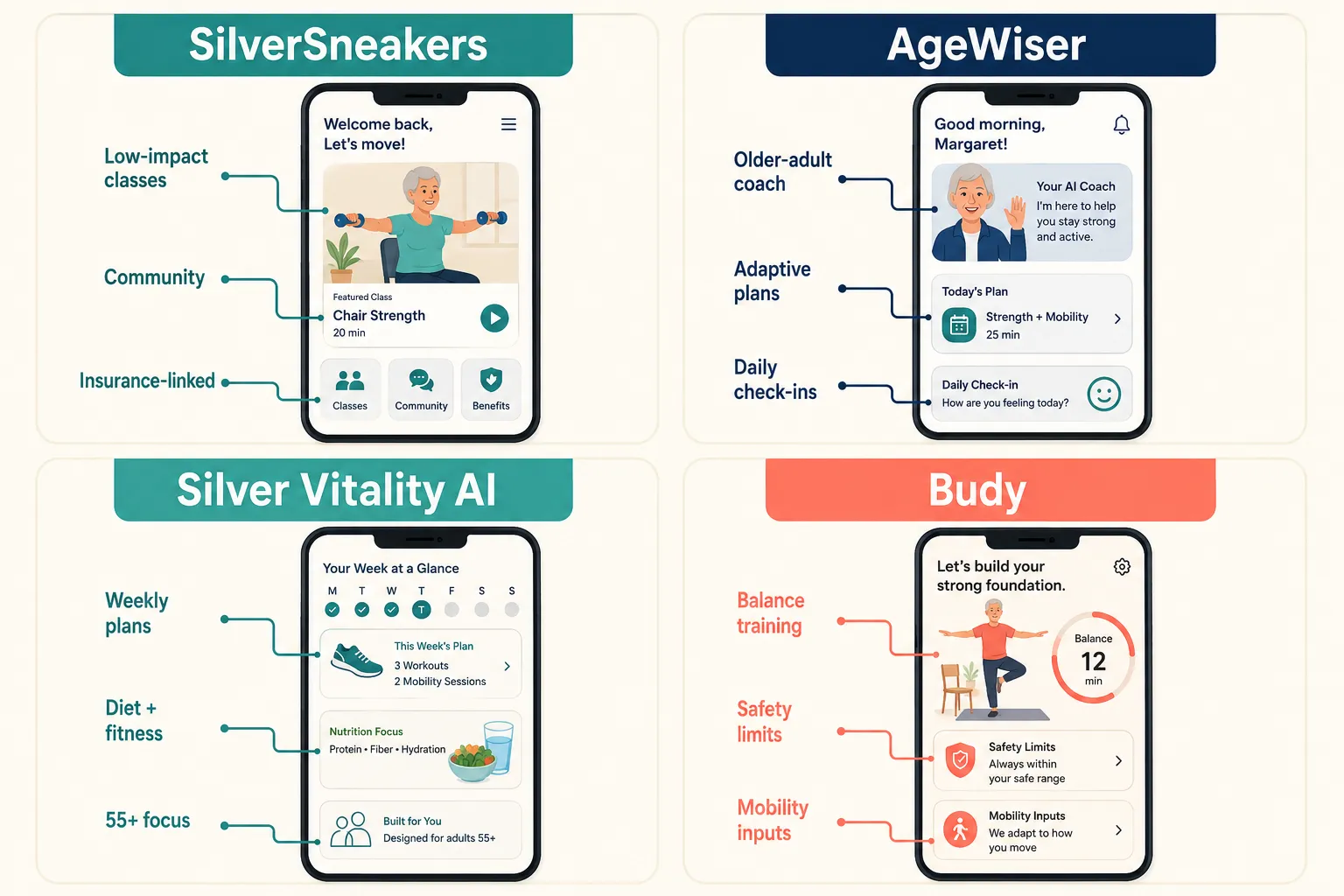
- Senior-focused apps like AgeWiser, Silver Vitality AI, Budy, and SeniorFit build plans around age, mobility level, and balance status, not generic fitness scores [3][4][13][14].
- AI form correction is helpful but not a replacement for a physical therapist, especially if you have a diagnosed condition or recent surgery.
- Many quality options are free or under $15/month, including SilverSneakers (often covered by Medicare Advantage) and web-based tools like SeniorFit [1][13].
- Apps with chair-based and low-impact modes (SitFit, Ageless Pilates, Tai Chi for Seniors) work well for arthritis, limited mobility, or balance concerns [1][2].
- You need a phone or tablet with a working camera, roughly 6-8 feet of clear space, and steady lighting, that's it.
- Best use case: general strength, balance, and mobility maintenance. Not appropriate for: post-op rehab, acute pain, or complex neurological conditions without a clinician's input.
What is movement assessment technology in fitness apps?
Movement assessment technology is computer vision software that watches you exercise through a camera and measures how your body moves in space. It identifies key points on your body, shoulders, hips, knees, ankles, wrists, and tracks how they shift frame by frame during a squat, a reach, or a balance hold.
The app then compares your movement pattern to a reference model and calculates things like:
- Joint angles (is your knee bending to 90 degrees or only 60?)
- Range of motion (how far can you rotate your shoulder?)
- Tempo and symmetry (are both legs doing equal work?)
- Stability (how much are you swaying during a single-leg stand?)
For seniors, the goal isn't athletic performance. It's catching compensations, like a hip that hikes up during a step-up, or a knee that collapses inward during a sit-to-stand, that predict falls or joint strain.
How do AI fitness apps track your form and posture?
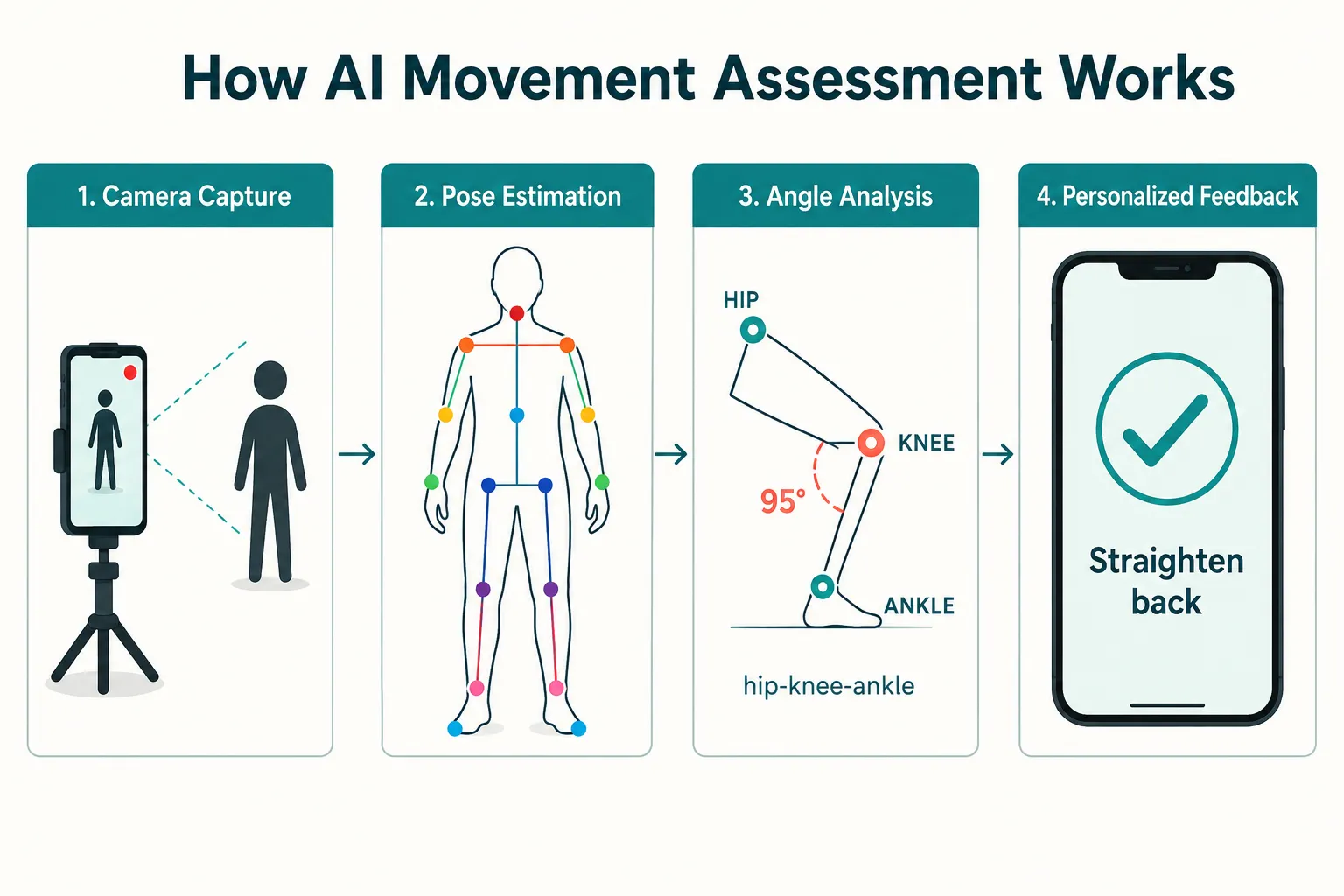
AI fitness apps track form using pose estimation models, the same family of computer vision tech behind gesture control and motion capture. Your phone camera captures 30 frames per second, and the model places digital "landmarks" on your joints in each frame.
Here's the simplified pipeline:
- Camera capture, a standard front or rear camera records you.
- Pose estimation, the AI locates 17 to 33 body keypoints in each frame.
- Angle and motion analysis, software calculates joint angles, velocity, and alignment.
- Rule-based or ML feedback, the app checks your numbers against safe ranges and delivers a cue like "straighten your back" or "hold for 2 more seconds."
Most senior-focused apps process this on-device, meaning video doesn't leave your phone. That matters for privacy, always check the app's data policy before use.
What's the difference between AI fitness apps and regular workout apps?
Regular workout apps show you a video and count reps. AI fitness apps watch you back and change what happens next based on how you moved.
| Feature | Regular Workout App | AI-Powered Fitness App |
|---|---|---|
| Program design | Fixed weekly plan | Adaptive, adjusts to performance |
| Feedback | None or manual logging | Real-time form cues |
| Progression | Preset weeks | Based on your movement data |
| Injury awareness | Generic warnings | Flags risky patterns live |
| Cost | Often free,$10/mo | Free,$30/mo |
For a 68-year-old with arthritic knees, the difference is meaningful. A regular app will keep prescribing lunges. An AI app notices the knee wobble on rep three, swaps to a supported split-squat, and shortens the range of motion automatically [14].
Best AI fitness apps for seniors with arthritis
For seniors with arthritis, the best AI fitness apps prioritize low-impact movement, joint-friendly ranges, and chair-based options. Top picks based on current 2026 offerings:
- SilverSneakers, low-impact classes and personalized scheduling for older adults, often covered by Medicare Advantage plans [1].
- Ageless Pilates, gentle mat and standing Pilates with age-appropriate progression [1].
- SitFit, chair-based routines built for users with joint pain or limited standing tolerance [2].
- Tai Chi for Seniors, slow, flowing movement that's easier on inflamed joints [1].
- Reverse Health, adaptive plans for the 40+ and senior demographic with joint-friendly options [2].
Decision rule: If a movement causes sharp joint pain (not muscle fatigue), stop and switch to a seated or supported version. Most of these apps offer that swap built in.
Can AI fitness apps prevent injury during workouts?
AI fitness apps can reduce injury risk, but they can't guarantee prevention. They help by catching common form errors in real time, rounded backs during hinges, knees caving during squats, holding breath during exertion, that lead to strains and falls over time.
What they do well:
- Flag deteriorating form as you fatigue
- Suggest scaled versions when a movement looks unstable
- Enforce rest days when performance drops
- Apply "conservative progression and safety boundaries" for older adults [14]
What they can't do:
- Diagnose pain or medical conditions
- Detect subtle neurological changes
- Replace clinical judgment after surgery or injury
- Sense pain you don't report
If you have a recent injury, hip or knee replacement, or a diagnosed balance disorder, use AI apps as a supplement to a physical therapist's plan, not a replacement.
How much do senior fitness apps with AI cost?
Senior AI fitness apps range from free to about $30 per month, with most quality options between $10 and $20 monthly. Some are covered by Medicare Advantage or supplemental insurance.
General pricing landscape (2026):
- Free tiers: SeniorFit (web-based, home assessment), FitOn (ad-supported), Workout.cool [1][13]
- Insurance-linked: SilverSneakers, free with many Medicare Advantage plans [1]
- Low-cost subscriptions: Daily Yoga, Tai Chi for Seniors, Ageless Pilates, typically $10,$15/month [1]
- Premium AI coaches: AgeWiser, Silver Vitality AI, Budy, usually $15,$25/month with annual discounts [3][4][14]
Annual billing usually cuts the price 30-50%. Most apps offer 7-day free trials, use them to check whether the interface actually works for you before committing.
Free AI fitness apps for older adults
Yes, several free AI fitness options exist for seniors. The tradeoff is usually fewer personalized features or ad interruptions, but the core movement tracking still works.
Notable free options:
- SeniorFit, web-based AI assessment with personalized senior exercises, no equipment required [13].
- FitOn, free classes with optional AI coaching upgrade, includes senior-appropriate categories [1].
- SilverSneakers, free if your Medicare Advantage plan includes it (check with your insurer) [1].
- Workout.cool, open catalog of free workouts with basic personalization [1].
Common mistake: Downloading five free apps at once. Pick one, use it for two weeks, then decide. Jumping between apps means none of them build enough movement data to actually personalize your plan.
Do I need special equipment for AI movement tracking?
No special equipment is required for most AI fitness apps beyond a smartphone or tablet with a working camera. That's the appeal, the phone in your pocket is the sensor.
Helpful but optional:
- A phone stand or tripod ($15,$25) so you're not propping the phone against a book
- A sturdy chair for supported exercises and balance work
- A non-slip mat for floor exercises
- Good lighting, a bright room or lamp facing you (backlighting confuses the camera)
Some premium apps integrate with Apple Watch, Fitbit, or Garmin for heart rate data, but wearables aren't required. Web-based tools like SeniorFit run in a browser without any app install [13].
How accurate is AI form correction for seniors?
AI form correction is reasonably accurate for gross movement patterns, squat depth, arm angle, whether you're leaning too far forward, but less accurate for subtle issues like scapular positioning or foot pronation. Accuracy also depends heavily on camera angle and lighting.
What affects accuracy:
- Camera placement, hip height, 6-8 feet away, side view for most exercises
- Lighting, even, front-facing light works best
- Clothing, loose or matching-background clothing reduces accuracy
- Body size and shape, pose estimation was historically trained on younger, average-sized bodies; newer models handle diverse bodies better
For seniors, treat AI cues as helpful reminders, not diagnostic verdicts. If the app says your knee is misaligned but you feel stable and pain-free, the cue might be a false positive. If it flags something and you also feel discomfort, listen to it.
Are AI fitness apps good for seniors with limited mobility?
Yes, several AI fitness apps are specifically built for limited mobility, offering chair-based routines, bed exercises, and supported standing options. Apps like SitFit, Ageless Pilates, and Tai Chi for Seniors provide seated variations tracked by AI [1][2].
Budy's app for older adults explicitly uses "mobility level, balance status, available equipment, and health notes" to build plans, meaning the AI knows to skip floor exercises if you can't get down safely [14]. Silver Vitality AI and AgeWiser take similar age-aware approaches [3][4].
Choose a chair-based AI app if you:
- Use a walker, cane, or mobility aid
- Have trouble getting up from the floor
- Recover from surgery or a fall
- Experience fatigue that limits standing time
Skip AI-only programs if you need hands-on physical assistance to move safely, those situations call for in-person care.
Can seniors use AI fitness apps without smartphones?
Yes, some AI fitness options run on tablets, smart TVs, or web browsers, so a smartphone isn't strictly required. SeniorFit is browser-based, meaning any laptop with a webcam will work [13]. Several apps also support Amazon Fire tablets and larger iPad screens, which many seniors find easier to see and tap.
Options without a smartphone:
- Web browser + laptop webcam, SeniorFit and similar portals [13]
- Tablet apps, most iOS and Android fitness apps also run on tablets
- Smart TV apps, SilverSneakers and FitOn have TV apps for Roku, Apple TV, Fire TV
- Voice assistants, Alexa and Google Assistant offer some senior workout routines, though without visual form tracking
A larger screen is often better for older adults regardless. A tablet propped on a stand shows form feedback more clearly than a small phone.
What happens if the app can't recognize your movements?
If the AI can't see you clearly, most apps pause the workout or show a "reposition camera" prompt. Common causes are poor lighting, being too close or too far from the camera, or clothing that blends with your background.
Quick fixes:
- Move the camera 6-8 feet away at roughly hip height
- Face a light source rather than a window behind you
- Wear contrasting clothing (dark against light walls, or vice versa)
- Clear the frame, no pets, family members, or clutter behind you
If the app repeatedly fails to track you, it may not have been trained on your body type, mobility aid, or environment. In that case, use the app's audio-only or video-only mode and skip the AI tracking. You'll still get a decent workout without the personalization layer.
How do I set up movement tracking in my home?
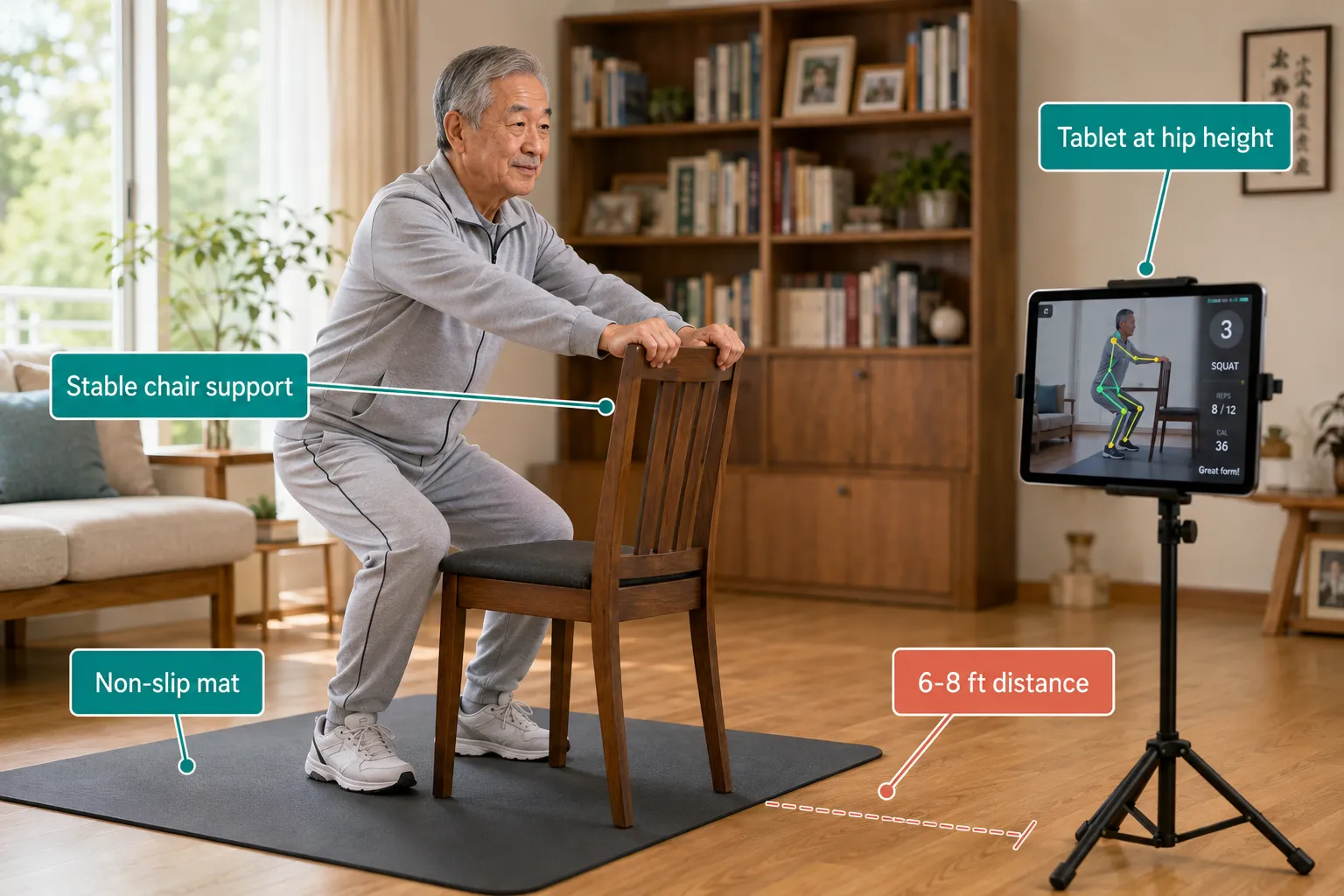
Setting up AI movement tracking takes about 10 minutes. Here's a clean checklist:
- Pick a room with at least 6 feet of clear space and even lighting.
- Place the camera at hip height, 6-8 feet from where you'll stand. A tripod or stack of books works.
- Angle the camera for a side view for most strength exercises, front view for balance work.
- Remove obstacles, rugs that slip, low tables, pet toys.
- Add a sturdy chair within arm's reach for balance backup.
- Wear contrasting clothing so the AI can find your outline.
- Do a test rep before starting, confirm the app draws the skeleton overlay on your body correctly.
- Enable audio cues so you can hear feedback without looking at the screen mid-exercise.
Once it's set up, leave the tripod in place. Consistency helps the AI build a movement baseline it can compare against week to week.
Is AI fitness technology safe for people with balance issues?
AI fitness apps can be safe for people with balance issues if the app is designed for that population and you have a sturdy chair or wall nearby. Apps like Budy include balance status as a planning input and apply "conservative progression and safety boundaries" specifically to protect fall-prone users [14].
Safety guidelines for balance issues:
- Choose apps with explicit senior or balance-focused modes (Budy, AgeWiser, SilverSneakers, Tai Chi apps) [1][3][14]
- Always exercise with a stable support, chair back, kitchen counter, or wall, within arm's reach
- Start with seated or supported standing exercises before progressing to free-standing
- Skip eyes-closed balance work unless cleared by a clinician
- Have a phone within reach in case you need help
If you've fallen in the past year or been diagnosed with a balance disorder, talk to your doctor or physical therapist before starting any AI program. Bring the app on your phone to the appointment and show them what it prescribes.
Frequently Asked Questions
Do AI fitness apps work for seniors over 80?
Yes, especially chair-based and low-impact apps like SitFit, Tai Chi for Seniors, and AgeWiser [1][2][3]. Start with 10-minute sessions and prioritize apps that let you disable jumping, floor work, and fast transitions.
Can I use an AI fitness app after a hip or knee replacement?
Only with your surgeon's or physical therapist's clearance, and typically not for the first 6-12 weeks post-op. AI apps are for maintenance, not rehab.
Will the AI report my data to my doctor?
Most consumer apps don't share data with clinicians automatically. Some let you export summaries you can share manually. Check the app's privacy policy.
Does the app watch me all the time?
No. The camera activates only during workouts, and most apps process video on-device without uploading it. Confirm this in the app's privacy settings.
What if I get frustrated with the technology?
Start with one 10-minute session, three times a week. Use audio-only cues if the visual feedback feels overwhelming. Ask a family member for help with the first setup, after that, it's usually just tapping "start."
Are there AI apps specifically for seniors with dementia or cognitive decline?
Not many. Most AI fitness apps assume the user can follow multi-step verbal cues. For cognitive impairment, seated group classes with a live instructor generally work better than app-based coaching.
How long until I see results?
Most seniors notice better balance and easier daily movement (getting up from a chair, climbing stairs) in 4-6 weeks of consistent 3x weekly sessions. Strength gains take 8-12 weeks.
Can I use these apps if I've never exercised before?
Yes. Apps like Silver Vitality AI and AgeWiser build in beginner assessments and start conservatively [3][4]. Tell the app honestly about your fitness level, overstating it triggers harder workouts than your body is ready for.
Conclusion
AI-powered fitness apps for seniors have moved past gimmicks. Movement assessment technology now delivers something genuinely useful: home workouts that adapt to your stiff mornings, your good balance days, and the slow build of strength over months. The best apps in 2026, AgeWiser, Silver Vitality AI, Budy, SeniorFit, SilverSneakers, and chair-based options like SitFit, treat older bodies as the design center, not an afterthought [1][3][4][13][14].
Your next steps:
- Pick one app based on your primary goal (balance, arthritis, general fitness) and mobility level.
- Use the free trial for at least 7 days before paying.
- Set up a dedicated corner with a chair, tripod, and good lighting.
- Commit to three 15-minute sessions per week for a month before judging results.
- Check with your doctor if you have any diagnosed condition, recent surgery, or history of falls.
The technology is helpful. Your consistency is what makes it work.
References
[1] Ai Workout App For Seniors – https://aitoolsbakery.com/blog/ai-workout-app-for-seniors/
[2] Best Chair Yoga And Tai Chi Apps For Seniors In 2026 Tested Ranked – https://aijourn.com/best-chair-yoga-and-tai-chi-apps-for-seniors-in-2026-tested-ranked/
[3] AgeWiser on Google Play – https://play.google.com/store/apps/details?id=com.tgi.agewiser&hl=en-US
[4] Silver Vitality AI on App Store – https://apps.apple.com/us/app/silver-vitality-ai/id6758680602
[9] AgeWiser AI Senior Care App – https://apps.apple.com/us/app/agewiser-ai-senior-care-app/id6468810140
[13] SeniorFit – referenced via industry roundups [1]
[14] Budy AI Workout App for Older Adults – referenced via industry roundups [1]